
 Made with Oraclip
Wan 3.0 AI video generator
Alibaba’s newest video model, ranked #1 for text-to-video on the Artificial Analysis leaderboard. Describe a scene or add a photo as the first frame, and get up to 30 seconds of video with sound at up to 1080p, right in your browser.
Make a video with Wan 3.0
Pick a starting scene or write your own. Add a photo if you want it as the first frame; without one, Wan 3.0 works from your text alone.
1 · Add a first frame (optional)
2 · Pick a starting scene
Need longer clips, edits or a last frame? Open the full composer
3 · Pick a model and generate
Only upload images you have the right to use. No minors and no public figures. If a video fails, your credits are refunded automatically. See plans
One prompt, three new models
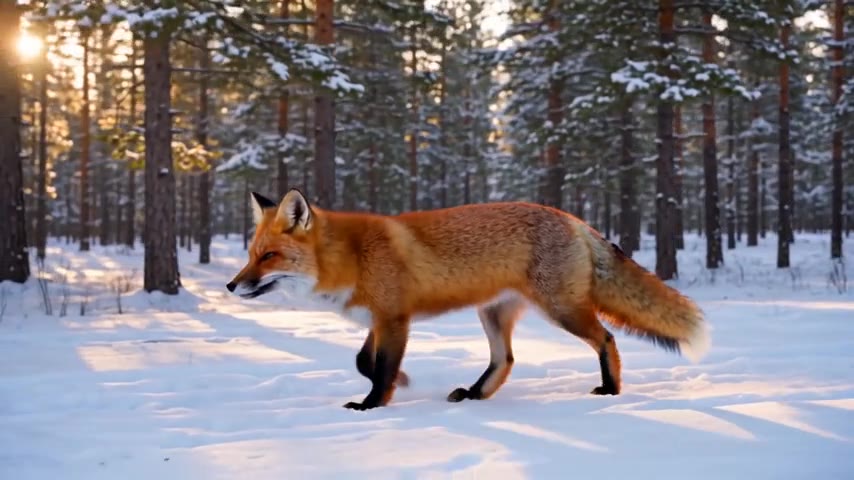
The same red-fox prompt rendered at 480p on Wan 3.0, Seedance 2.0 Mini and Grok Imagine Video 1.5, with no retries and no edits.
- Made with Oraclip
Wan 3.0
Made with Wan 3.0 · 480p · 5 s
- Made with Oraclip
Seedance 2.0 Mini
Made with Seedance 2.0 Mini · 480p · 5 s
- Made with Oraclip
Grok Imagine Video 1.5
Made with Grok Imagine Video 1.5 · 480p · 6 s
Tap a video to watch with sound. All three clips were generated through the same model routes Oraclip uses, from one text prompt, with no photo and no retries. contact@oraclip.com
What is Wan 3.0?
Wan 3.0 is the third generation of Alibaba’s Wan video models. Alibaba opened a beta on August 7, 2026 and made it generally available on August 24. The big change from Wan 2.7 is length: one generation can now run up to 30 seconds instead of 15, with smart duration and video extension, at 480p, 720p or 1080p.
On the Artificial Analysis text-to-video leaderboard (with audio) it sits at #1 with an Elo of 1,175 as of October 22, 2026, ahead of Seedance 2.5 and MiniMax H3. Alibaba itself says audio texture and on-screen text are still maturing, so keep important lettering out of the shot or add it in editing.
What you can do with it in Oraclip
Text-to-video, or a photo as the first frame (in the full composer you can also add a last frame). Clips run 2 to 30 seconds at 480p, 720p or 1080p, in 16:9, 9:16, 1:1, 4:3 or 3:4, with sound you can turn off.
Where it is strongest
Long single shots, natural camera moves and scenes that need time to play out: a product reveal, a short story beat, a slow drone flight. Plain-language prompts work well.
Wan 3.0 vs Seedance 2.0 Mini vs Grok Imagine Video 1.5
All three are in the picker above. Credits are what Oraclip charges for one clip.
| Wan 3.0 | Seedance 2.0 Mini | Grok Imagine Video 1.5 | |
|---|---|---|---|
| Made by | Alibaba | ByteDance | xAI |
| Length in Oraclip | 2–30 s | 4–15 s | 1–15 s |
| Resolution | 480p, 720p, 1080p | 480p, 720p | 480p, 720p |
| Sound | Optional | Optional | Always on |
| Inputs | Text, first frame, last frame | Text, first and last frame, up to 9 reference images | Text or one first-frame image |
| 5 s at 720p | 380 credits | 210 credits | 120 credits |
| 15 s at 720p | 1,140 credits | 630 credits | 350 credits |
Which one should I pick?
Wan 3.0 for the best quality and anything longer than 15 seconds or at 1080p. Seedance 2.0 Mini for reference-driven clips on a budget. Grok Imagine Video 1.5 for quick drafts at the lowest cost.
Credits checked on October 22, 2026. Grok Imagine Video 1.5 runs as a preview model in Oraclip.
How to use Wan 3.0 online
- 1
Describe the shot
Pick a starting scene or type your own: who is in it, what happens, how the camera moves and what we hear.
- 2
Add a first frame if you have one
A photo makes the clip start exactly on that image. Leave it out for pure text-to-video.
- 3
Generate and download
Choose Wan 3.0 at 720p or 1080p and generate. The finished clip lands in your library, ready to download.
Prompts that work well on Wan 3.0
- One clear subject and one main action
- A named camera move: tracking, orbit, dolly-in, drone
- The sound you want: ambience, a line of dialogue, music
Weaker results
- Long on-screen text, signs or captions
- Many characters doing different things at once
- Several unrelated scenes packed into one clip
Fine-tune your video
Same prompt, full controls: switch the model, length or aspect ratio, attach a reference video, then generate.
Wan 3.0 FAQ
Can I try Wan 3.0 for free?
Signing up is free (no card) and new accounts get 100 credits, valid for 5 days. A 5-second Wan 3.0 clip starts at 190 credits at 480p, so regular use needs a plan or a one-time credit pack. The exact cost shows before every render, and failed renders are refunded.
How many credits does a Wan 3.0 video cost?
Wan 3.0 is charged per second: a 5-second clip costs 190 credits at 480p, 380 at 720p and 760 at 1080p. A full 30-second clip at 1080p costs 4,560 credits. If a video fails, the credits are refunded automatically.
How long can a Wan 3.0 video be?
From 2 to 30 seconds in one generation. This page makes 5-second clips; open the full composer to set any length up to 30 seconds.
Is Wan 3.0 better than Seedance 2.5?
On the Artificial Analysis text-to-video board (October 22, 2026) Wan 3.0 is #1 and Seedance 2.5 is 17 points behind; for image-to-video, Seedance 2.5 ranks slightly higher. Wan 3.0 also costs fewer credits per second in Oraclip. For reference-driven clips (several images, a video or audio as input) Seedance 2.5 is still the better tool.
Can Wan 3.0 animate my photo?
Yes. Add a photo and Wan 3.0 uses it as the first frame of the clip. It does not take several reference images at once; for that, use Seedance 2.0 Mini or Seedance 2.5.
Does Wan 3.0 make sound?
Yes, sound is generated with the video (ambience, effects, dialogue or music) and you can switch it off in the full composer. Alibaba notes that audio texture is still maturing, so check important dialogue before you publish.
More models and guides
Try the #1 text-to-video model
Write a scene, pick Wan 3.0 and get a clip with sound in minutes.