
Grok Imagine Image 2.0: Features, Rankings and Cost
Grok Imagine Image 2.0 explained: xAI’s typography-focused image model, its LMArena rank, a poster test, strengths, limits and its 21-credit price in Oraclip.
 Oraclip Team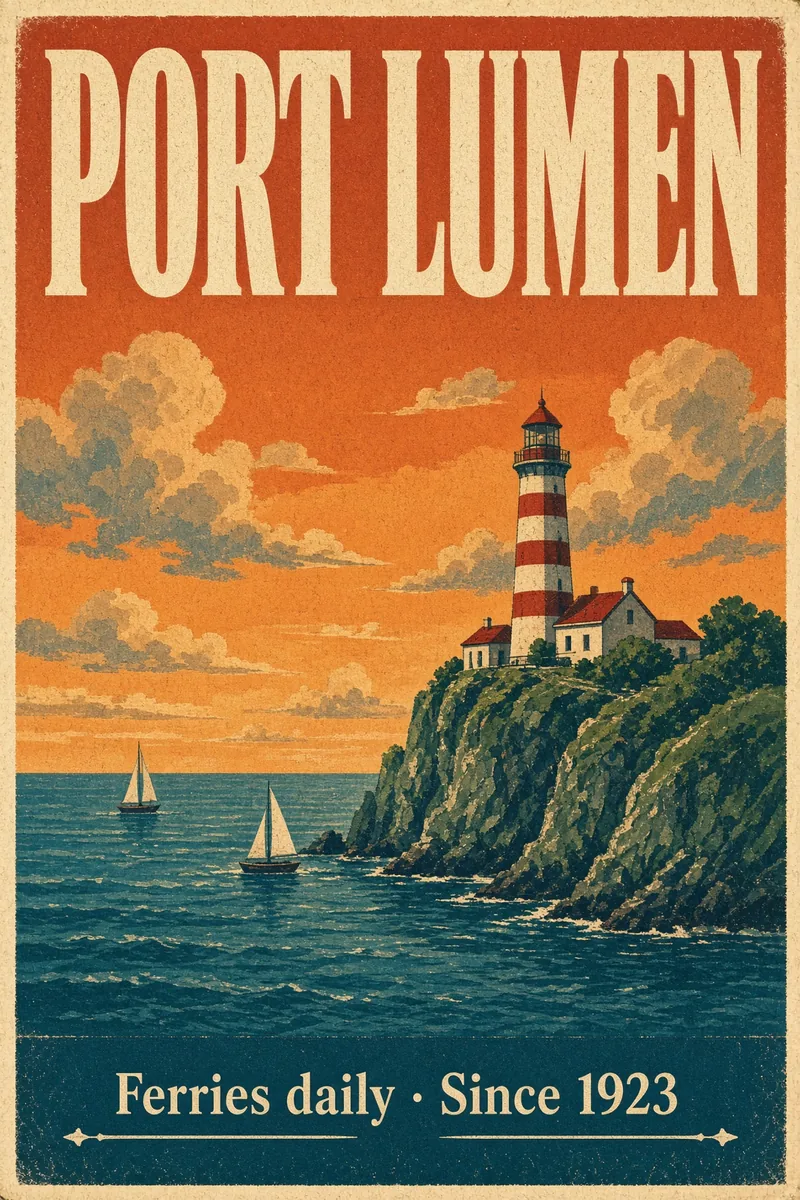
Grok Imagine Image 2.0 is xAI's second-generation image model, built for typography, layout and quick edits. In Oraclip it is a flat 21 credits per image, the same as Nano Banana 2.1 at 1K, and in our test it was the fastest of the four new image models. This Grok Imagine Image 2.0 guide covers what the model does, how it ranks, where it is weaker and how to use it. Facts were checked on October 22, 2026.
What is Grok Imagine Image 2.0?
xAI announced Grok Imagine Image 2.0 on August 8, 2026, available in the xAI API as grok-imagine-image-2.0. xAI highlighted four things:
- Typography and layout: posters, covers and social graphics with readable text.
- Region editing: select part of an image (a "magic wand" selection in Grok) and change only that area.
- Background removal.
- Multi-reference generation with up to 5 images.
At launch xAI said the model ranked #2 on both the text-to-image and image-edit leaderboards (as of August 7, 2026). Leaderboards move; see the current picture below.
Grok Imagine Image 2.0 specs: official vs in Oraclip
| Grok Imagine Image 2.0 (xAI) | Grok Imagine Image 2.0 in Oraclip | |
|---|---|---|
| Released | August 8, 2026 | Available now |
| Inputs | Text, images, region selection | Text and up to 5 reference images |
| Editing | Region edit, background removal | Prompt-based edits of an attached image |
| Size | 1K output | 1K |
| Aspect ratios | Several | Auto, 1:1, 2:3, 3:2, 9:16, 16:9 |
| Price | Per image (xAI API) | 21 credits per image |
Oraclip uses the model for text-to-image and reference-based edits. The region selection and one-click background removal are features of xAI's own apps and API that Oraclip does not expose; describe the change in words instead.
How Grok Imagine Image 2.0 ranks
On LMArena (snapshot of October 7, 2026), Grok Imagine Image 2.0 is #4 for text-to-image at 1,334, behind GPT Image 2.5 Sunburst (1,425), GPT Image 2.5 Flare (1,398) and GPT Image 2 (1,383), and ahead of Nano Banana 2.1 (1,328). For image editing it scores 1,439, again ahead of Nano Banana 2.1 (1,426) and behind both GPT Image 2.5 models.
So the #2 launch claim no longer holds after OpenAI's 2.5 release, but Grok Imagine Image 2.0 is still the strongest of the 21-credit image models in Oraclip on both boards.
Grok Imagine Image 2.0 strengths
- Fast. Our test poster came back in 25 seconds, against 37 for GPT Image 2.5 Flare and 227 for Nano Banana 2.1 (one run each; times depend on queue load).
- Readable text. It spelled both lines of our poster correctly, with a clean serif footer.
- Cheap. 21 credits per image.
- Good layout sense for posters, thumbnails and covers.
Grok Imagine Image 2.0 weaknesses
- 1K only. For print or large displays, use GPT Image 2.5 or Nano Banana 2.1 at 2K or 4K.
- Five references at most, against 16 for GPT Image 2.5 and 10 for Nano Banana 2.1 in Oraclip.
- Composition choices. In our test the lighthouse came out small and far away, while the other models made it the hero of the poster. Say explicitly what should dominate the frame.
- No region selection in Oraclip, so precise local edits rely on the prompt.
How to prompt Grok Imagine Image 2.0
- Quote every piece of text and say where it goes.
- Name the hero object and its size: "a large lighthouse fills the right third of the poster".
- Keep style words concrete: "screen print, paper grain, flat shapes".
- For edits, attach the image and describe only the change: "replace the sky with a starry night, keep everything else".
Grok Imagine Image 2.0 vs other image models in Oraclip
| Grok Imagine Image 2.0 | Nano Banana 2.1 | GPT Image 2.5 Flare | GPT Image 2.5 Sunburst | |
|---|---|---|---|---|
| Made by | xAI | OpenAI | OpenAI | |
| LMArena text-to-image | 1,334 | 1,328 | 1,398 | 1,425 |
| Sizes in Oraclip | 1K | 1K, 2K, 4K | 1K, 2K, 4K | 1K, 2K, 4K |
| References in Oraclip | 5 | 10 | 16 | 16 |
| Credits at 1K | 21 | 21 | 31 | 31 |
The full side-by-side is in best AI image models, and the OpenAI pair is covered in the GPT Image 2.5 guide.
How to use Grok Imagine Image 2.0 in Oraclip
- Open the Oraclip creator and switch to image mode.
- Choose Grok Imagine Image 2.0 in the image model menu.
- Pick an aspect ratio. Size is fixed at 1K.
- Attach up to 5 reference images if you want.
- Write the prompt and generate: 21 credits per image.
Grok Imagine Image 2.0 FAQ
Is Grok Imagine Image 2.0 free?
Not in Oraclip: it costs 21 credits per image. Signing up is free, and new accounts get starter credits.
What resolution does Grok Imagine Image 2.0 make?
1K. Choose GPT Image 2.5 or Nano Banana 2.1 if you need 2K or 4K.
Can Grok Imagine Image 2.0 edit photos?
Yes. Attach the photo and describe the change. xAI's region selection is not available in Oraclip, so describe the area in words.
Is Grok Imagine Image 2.0 the same as Grok Imagine Video?
No. Grok Imagine Image 2.0 makes still images. Grok Imagine Video 1.5 is xAI's video model.
Is Grok Imagine Image 2.0 better than Nano Banana 2.1?
On LMArena it scores slightly higher for both text-to-image and editing, and it was much faster in our test. Nano Banana 2.1 offers 2K and 4K and twice as many references.
Try Grok Imagine Image 2.0
For posters, thumbnails and quick edits at 1K, Grok Imagine Image 2.0 is a fast, low-cost first pick. Open the Oraclip creator and choose it in the image model menu.
Sources (checked October 22, 2026): xAI: Grok Imagine Image 2.0 · xAI API documentation · LMArena: text-to-image leaderboard · LMArena: image edit leaderboard · Kie: Grok Imagine Image 2.0