
GPT Image 2.5: Flare vs Sunburst, Tested and Compared
GPT Image 2.5 Flare vs Sunburst: OpenAI’s fast and precision image models compared on one poster prompt, LMArena rank, speed, prompt tips and credit cost.
 Oraclip Team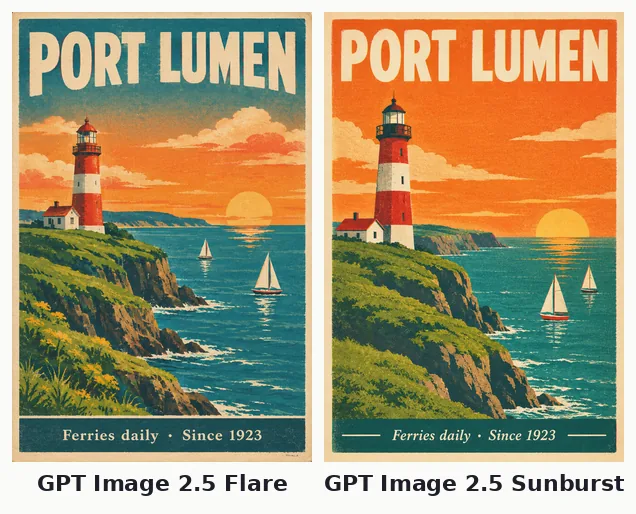
GPT Image 2.5 is OpenAI's newest image model, and it comes in two versions: Flare, built for speed, and Sunburst, built for precision. On the LMArena text-to-image leaderboard they hold the top two places. This GPT Image 2.5 guide explains the difference between Flare and Sunburst, how they compare with GPT Image 2, what they cost in Oraclip and how to prompt them. Facts were checked on October 22, 2026.
What is GPT Image 2.5?
OpenAI introduced ChatGPT Images 2.5 on September 8, 2026, with two API models behind it:
- GPT Image 2.5 Flare is the fast one. OpenAI says it cuts latency by about 50% compared with GPT Image 2 and recommends it as the default for most apps.
- GPT Image 2.5 Sunburst is the precision model, aimed at premium work where layout, text and fine detail matter more than speed.
Both generate images from text, edit images from references and, in OpenAI's API, support quality levels from low to max and transparent backgrounds.
GPT Image 2.5 Flare vs Sunburst at a glance
| Flare | Sunburst | |
|---|---|---|
| OpenAI positioning | Fast, default for most apps | Precision, premium output |
| Speed (OpenAI) | About 50% lower latency than GPT Image 2 | Slower |
| LMArena text-to-image (Oct 7, 2026) | #2, 1,398 | #1, 1,425 |
| LMArena image edit (Oct 7, 2026) | 1,481 | 1,514 |
| Our test render time (one poster, 1K) | 37 s | 80 s |
| Sizes in Oraclip | 1K, 2K, 4K | 1K, 2K, 4K |
| Reference images in Oraclip | Up to 16 | Up to 16 |
| Credits in Oraclip | 31 / 51 / 81 | 31 / 51 / 81 |
Render times are from a single run on October 22, 2026 and depend on queue load. Oraclip charges the same credits for both, so the choice comes down to speed vs quality, not price.
What we saw in a side-by-side test
We gave both models one prompt: a vintage screen-printed travel poster for a fictional town, with a large headline ("PORT LUMEN"), a small footer line ("Ferries daily · Since 1923"), a lighthouse, two sailboats and a sunset. Results:
- Both spelled both lines correctly, including the middle dot in the footer.
- Sunburst produced cleaner shapes and a more even print texture, closer to a real screen print.
- Flare finished in less than half the time and added extra detail (flowers in the foreground), with slightly softer type.
One prompt is not a benchmark, but it matches the leaderboard order: Sunburst for the final, Flare for iteration.
GPT Image 2.5 vs GPT Image 2
GPT Image 2, released in April 2026, is still in Oraclip. On LMArena (October 7) it scores 1,383 for text-to-image, below both 2.5 models. The practical differences in Oraclip:
- Quality tiers. GPT Image 2 has low, medium and high quality, from 6 credits (1K low) to 641 (4K high). GPT Image 2.5 has one flat price per size.
- Cost at the default. At 1K, GPT Image 2 medium is 48 credits; GPT Image 2.5 is 31.
- Drafts. GPT Image 2 at low quality (6 credits at 1K) is still the cheapest way to sketch an idea.
The GPT Image 2 vs Nano Banana 2.1 guide covers the older model in detail.
How to prompt GPT Image 2.5
- Quote the exact text you want on the image, and say where it goes: "headline at the top reads ...", "small line at the bottom reads ...".
- Describe the style concretely: medium (screen print, watercolour, product photo), palette, texture.
- List what must not appear: "no people", "no extra text".
- For edits, say what stays the same: "keep the product, label and background; change only the lighting".
- Use references for consistency. Oraclip accepts up to 16 images; tell the model what each is for.
What GPT Image 2.5 costs in Oraclip
| Size | Flare | Sunburst |
|---|---|---|
| 1K | 31 credits | 31 credits |
| 2K | 51 credits | 51 credits |
| 4K | 81 credits | 81 credits |
The cost shows before you generate, and failed images are refunded. Plans are on the pricing page.
How to use GPT Image 2.5 in Oraclip
- Open the Oraclip creator and switch the composer to image mode.
- Choose GPT Image 2.5 Flare or GPT Image 2.5 Sunburst in the image model menu.
- Pick a size (1K, 2K or 4K) and an aspect ratio, from 9:16 to 21:9.
- Attach up to 16 reference images if you have them.
- Write the prompt and generate.
Turn the result into a clip with the image to video AI tool.
GPT Image 2.5 FAQ
What is the difference between GPT Image 2.5 Flare and Sunburst?
Flare is OpenAI's fast model, about 50% lower latency than GPT Image 2. Sunburst is the precision model and ranks #1 on LMArena text-to-image. In Oraclip they cost the same.
Is GPT Image 2.5 better than Nano Banana 2.1?
On LMArena (October 7, 2026) both GPT Image 2.5 models rank above Nano Banana 2.1 for text-to-image and editing. Nano Banana 2.1 costs fewer credits at 1K (21 vs 31) in Oraclip. See best AI image models for a full comparison.
Can GPT Image 2.5 make transparent backgrounds?
OpenAI's API supports transparent backgrounds for GPT Image 2.5. Oraclip does not expose a transparency option yet.
Does GPT Image 2.5 have quality levels in Oraclip?
No. OpenAI's API has levels from low to max; Oraclip uses one setting per size with a flat credit price.
Which GPT Image 2.5 model should I use for text-heavy posters?
Sunburst. Both rendered our poster text correctly, but Sunburst's lettering was crisper and its layout cleaner.
Try GPT Image 2.5
Draft with Flare, finish with Sunburst, or run one prompt on both and keep the better one. Open the Oraclip creator and pick GPT Image 2.5 in the image model menu.
Sources (checked October 22, 2026): OpenAI: Introducing ChatGPT Images 2.5 · LMArena: text-to-image leaderboard · LMArena: image edit leaderboard · Kie: GPT Image 2.5 Flare · Kie: GPT Image 2.5 Sunburst