
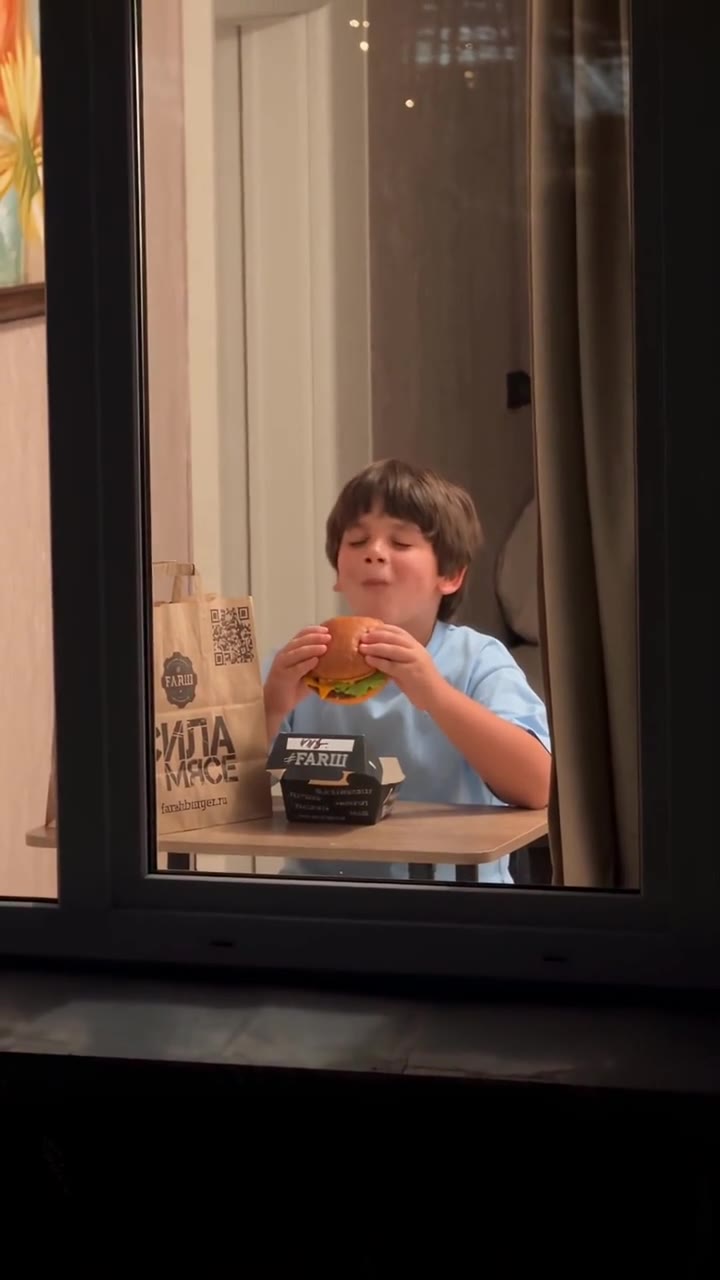
 Example
Caught at the Window AI Ad Generator for Small Businesses
The viral YAKALANDIN curtain ad, starring your product: the camera flies to one lit window at night, someone enjoying your product catches it watching, glares, pulls the curtains shut, and your logo appears on them. Upload a product photo and your logo, and get a 10-second vertical ad with sound.
Make your curtain ad
Add your product and your logo, pick who gets caught and generate. The night shot, the stare, the curtains and the logo ending are already in the prompt.
1 · Add your product and logo
2 · Who gets caught?
3 · Pick a model and generate
Only upload products and logos you own or have permission to use. The people in the ad are AI-made, not real customers; label it as AI when you post it. Not affiliated with Sofa Burger, the creators shown or any brand on this page. Failed renders are refunded automatically. See plans
What is the Caught at the Window AI ad?
Caught at the Window is the viral AI commercial format of October 2026, called the YAKALANDIN trend (“you got caught”) in Turkey and the curtain ad (perde reklamı, реклама шторы) elsewhere. One continuous night shot flies to the only lit window of an apartment block; inside, people are enjoying a product; one of them notices the camera, stares at it, walks over and pulls the curtains shut, and the brand logo appears on the glowing curtains.
It works for small businesses because it looks like a neighbour filmed it, the product is the reason for the stare, and the logo is the punchline. Burger shops started it; cafés, bakeries, water brands, cosmetics and pet food followed within a week.
The ad, second by second
- 10–3 s: night, the camera flies toward the one lit window.
- 23–5 s: inside, people enjoy your product, label in view.
- 35–7 s: one of them notices the camera and glares into the lens.
- 47–9 s: they put it down, walk to the window and pull the curtains.
- 59–10 s: your logo appears on the glowing curtains.
Where the trend started
October 8, 2026: the Ankara burger shop Sofa Burger posts the first ad, a boy eating a burger who closes the curtain: “Stop staring at someone else’s burger.”
October 11: the AI creator @karina.aicontent remakes it as a concept ad made with Seedance 2.5; it passes 25 million views and 2 million likes.
October 13: Ülkü KURT (@ulkustyle) names it the YAKALANDIN trend and shares her prompt; small brands across Turkey, Azerbaijan, Kazakhstan and Russia post their own.
Caught at the Window AI ad examples
The original, the viral AI remake and versions made by other AI ad tools. Every card credits the creator or site that made it.
- Example
The viral AI remake: a boy caught with his burger (concept ad, Seedance 2.5, 25M views)
- Example
Two friends, a burger and the EMBERLY logo on the curtains (made with Thumix)
By thumix.com
- Example
Two friends with a FLAMORY burger box (made with MakeViral)
By makeviral.ai
- Example
Where it started: Sofa Burger’s “Stop staring at someone else’s burger”
By @sofaburgers
- Example
YAKALANDIN trend: a mineral water six-pack, then the logo on the curtains
By @ulkustyle
- Example
Solo version: caught mid-bite with a plate of pasta (Trendai)
Tap a clip to play it with sound. Clips shown for reference; rights belong to their creators and brands. Creators can ask us to remove a clip at any time. contact@oraclip.com
How to make a Caught at the Window AI ad
- 1
Upload your product photo
A sharp packshot with the label facing the camera works best: a burger box, a drink, a jar, a bottle or a shop bag.
- 2
Upload your logo
A flat logo on a plain background. No logo file? Photograph your bag or box with the logo big and sharp.
- 3
Pick who gets caught
Two friends, a solo snacker, a family dinner or a beauty routine. Add your brand name so the model spells it right.
- 4
Generate, then post
You get a 10-second clip with night ambience, a curtain swish and a music sting on the logo. Add your line and how to order, and post it as a Reel, TikTok or Short.
Who gets caught: four versions
Pick one in the generator, or tap a card to load it.
Two friends
The classic: two friends at a table with your food or drink and the box in view.
Solo snack
One person on the sofa with a late-night snack: best for delivery and takeaway.
Family dinner
A family sharing your product at dinner: pizza, desserts, family packs.
Beauty & products
Someone caught trying your cream, perfume or gadget at the mirror.
AI ad ideas for small businesses
The stare needs a reason. Pair the scene with a line that makes your product the thing worth hiding.
| Business | What they are caught with | Line to post |
|---|---|---|
| Burger or kebab shop | A burger box, fries, the paper bag | “Stop staring at someone else’s burger. Order your own.” |
| Pizza or delivery | An open pizza box on the sofa | “Some nights are not for sharing.” |
| Café or bakery | Coffee cups and a cake box | “The last slice is already taken.” |
| Drinks and water | A six-pack or bottles on the table | “Get your own. Link in bio.” |
| Cosmetics | A cream, a perfume, a lipstick | “Our secret. Now yours too.” |
| Pet food | A bag of treats, a curious dog in the room | “Even the dog is not sharing.” |
Product and logo photos that work best
- One product, label facing the camera, plain background
- A flat logo with big, simple letters
- Your branded bag or box if you have no logo file
- A dark background behind a white logo
Weaker results
- Several products or a busy shelf in one photo
- Tiny print, long slogans or thin script logos
- A white logo on a transparent PNG (it turns white on white)
- Blurry, dark or angled photos
What goes wrong, and how to fix it
| Problem | Fix |
|---|---|
| A letter of the logo comes out wrong | Use a cleaner flat logo, type the brand name in the name box, or try Seedance 2.5. You can also lay your original logo over the last second in CapCut. |
| The product looks different | Use a sharper photo with the label facing the camera and nothing else in the frame. |
| Several windows are lit, or the shot cuts | Generate again: every run is a new take. Most creators post the best of two or three. |
| They close the curtains straight away | Generate again, or add “stares for two seconds first” to the prompt in the fine-tune box. |
How to post your curtain ad
Post it as an ad, not as real footage: keep the AI label on (TikTok: “AI-generated content”; Instagram: “AI info”). Write the line people say, then how to order: your delivery app, phone number or link in bio.
It also works as a paid ad. The 9:16 version fits Reels, TikTok and Shorts placements; pick 16:9 for YouTube, your website or a screen in your shop. Only use products, logos and brand names you own.
Fine-tune your video
Same prompt, full controls: switch the model, length or aspect ratio, attach a reference video, then generate.
Caught at the Window AI ad FAQ
What is the Caught at the Window AI ad?
A viral AI commercial format from October 2026, also called the YAKALANDIN trend or the curtain ad. One night shot flies to a lit window, someone inside is enjoying a product, notices the camera, glares, pulls the curtains shut, and the brand logo appears on them. It started with an ad by Sofa Burger in Ankara on October 8, 2026.
How do I make a Caught at the Window ad with my product?
Upload a photo of your product in the first box and your logo in the second, pick who gets caught, optionally type your brand name, and press Generate. You get a 10-second ad with sound in your Library.
Is this an AI ad generator I can use for my small business?
Yes. It turns your own product photo and logo into a ready-to-post video ad, with no film crew and no editing app. Use it for organic posts or paid ads, as long as you own the product, logo and brand name or have permission to use them.
Which AI model makes the video?
Seedance 2.0 at 480p by default, the cheapest way to test your ad. Switch to Seedance 2.5 at 720p for a sharper product and logo; the 25-million-view original was made with Seedance 2.5.
How many credits does it cost?
A 10-second ad costs 920 credits with Seedance 2.0 at 480p (the default) or 2,000 with Seedance 2.5 at 720p. Your two images are free inputs. Failed renders are refunded automatically.
Can I make it for free?
Signing up is free (no card) and new accounts get 100 credits, valid for 5 days (one grant per email). They cover images, and chatting with the agent is free, but not a video: the cheapest clip is 370 credits, so videos need a plan or a one-time credit pack. The exact cost shows before every render, and failed renders are refunded.
Will my logo come out exactly right?
Usually close, but AI video can change small letters. A flat logo with big letters on a plain background and your brand name in the name box help the most. For a paid campaign, lay your original logo over the last second in CapCut or any editor.
What products work best?
Anything people enjoy at home and that reads from across a room: burgers, pizza, desserts, coffee, drinks, snacks, cosmetics, perfume, gadgets and pet food. Use a sharp photo with the label facing the camera.
Is the YAKALANDIN trend the same as the curtain ad?
Yes. YAKALANDIN (“you got caught”) is the Turkish name, gözün kalmasın (“don’t stare at it”) comes from the first ad’s caption, and in English it is called the Caught at the Window ad, the curtain ad, the window ad or the window peeper trend.
Can I make a horizontal version?
Yes. Pick 16:9 under Format for YouTube, your website or a screen in your shop; 9:16 is for Reels, TikTok and Shorts. Both cost the same.
More trends and ad tools
Get caught with your product before the trend moves on
One product photo, one logo, a 10-second ad with sound.