
 Example
Hotel Lobby AI Video Generator: The Hotel Lobby Trend From 2 Photos
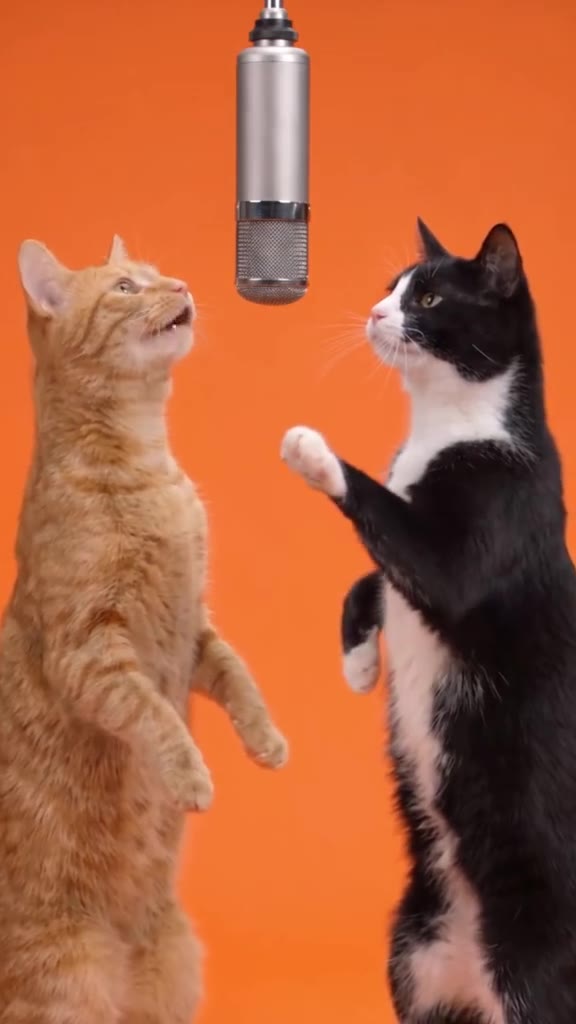
The Hotel Lobby AI trend drops two performers onto a bright orange stage in front of one hanging studio mic, rapping to “Hotel Lobby”. Add two photos, of you and a friend or of two pets, and get the trend’s 4-second duet: one sings up at the mic, the other answers with the hand moves.
Make your Hotel Lobby AI video
Photo 1 · The one on the left, singing up at the mic. Photo 2 · The one on the right, doing the hand moves. Add both photos in that order and generate. Seedance 2.5 recreates the trend clip shot for shot with your two stars, with the trend’s own sound.
1 · Photo 1 · Left, at the mic, Photo 2 · Right, the hand moves
2 · Who is performing?
3 · Generate and download
Only upload photos of people who agreed to be in the video. No public figures, no minors. Exact cost shows before you generate. See plans
Hotel Lobby AI trend examples
TikTok posts from the Hotel Lobby AI trend, with their original sound. Each one links to the creator’s post.
- Example
Sep 18: two cats refuse to share the mic
Original post by @wish_ai
- Example
“The best duo for this trend”, 6M+ views
Original post by @therealmeowfia
Tap a clip to play it with sound. Shown for reference; rights belong to the creator. Creators can ask us to remove a clip at any time. contact@oraclip.com
What is the Hotel Lobby AI trend?
The Hotel Lobby trend borrows the look of a famous studio performance of “Hotel Lobby” by Quavo and Takeoff: a plain orange wall, one silver mic hanging from above and two performers trading lines. The AI version swaps in anyone: two friends, a couple, or, most often, two cats standing up on their hind legs and rapping at the mic.
It works because the set is so simple. With no props and no cuts, all of the joke sits on the two faces and the hand moves, so a Hotel Lobby AI video reads at a glance in a feed. People search for a Hotel Lobby AI generator, a Hotel Lobby AI template or a “character swap”; on this page it is two photos and one button.
How the Hotel Lobby AI trend spread
- 1Sep 18: @wish_ai posts two cats who “booked studio time and refused to share the mic”.
- 2Sep 23: @therealmeowfia posts “the best duo for this trend”, which passes 6 million views.
- 3Late September and October: searches for “hotel lobby ai” reach about 310K in 28 days worldwide, and “how to do the hotel lobby ai trend” is one of the top questions.
What your 4-second clip shows
The same orange stage and hanging silver mic as the trend clip, in 9:16. The star from Photo 1 stands on the left, looking up and singing into the mic. The star from Photo 2 stands on the right, raising a hand to the beat, pointing and gesturing like a rapper answering the line. Fixed camera, no cuts, no on-screen text.
How to do the Hotel Lobby AI trend in 3 steps
- 1
Add two photos in order
Photo 1 goes on the left at the mic; Photo 2 goes on the right with the hand moves. One photo with both stars side by side works too.
- 2
Say who is performing
Two friends, two pets or a couple. The stage, the mic, the moves and the timing stay the same as the trend clip.
- 3
Generate and post
Your Hotel Lobby AI video renders in a few minutes in 9:16 with the trend’s own sound, ready for TikTok, Reels or Shorts.
Photo tips for the Hotel Lobby duet
- One star per photo, face clearly visible
- Upper body or full body, so the hand moves read
- Pets photographed at their eye level, looking near the camera
Avoid
- Group photos with three or more people
- Sunglasses, hats or hands covering the face
- Photos of celebrities or of people who did not agree to be in the video
Fine-tune your video
Same prompt, full controls: switch the model, length or aspect ratio, attach a reference video, then generate.
Hotel Lobby AI FAQ
What is the Hotel Lobby AI trend?
An AI video trend where two performers, often two cats, rap to “Hotel Lobby” at a hanging mic on a plain orange stage. On this page it is made from two photos.
How do I do the Hotel Lobby AI trend?
Add Photo 1 (left, at the mic) and Photo 2 (right, the hand moves), pick who is performing and press Generate. You get the 4-second duet in 9:16 with the trend sound.
Is this a Hotel Lobby AI template or a character swap?
Both, in practice. Your two photos take the places of the two performers in the trend clip, while the stage, the mic, the moves and the timing stay the same.
Can I use my pets?
Yes, pets are the most popular version. Pick Two pets; they stand upright on their hind legs like the cats in the trend.
Can I do it with one photo?
Yes. Upload one photo with both stars side by side: the one on the left takes the mic and the one on the right does the hand moves.
What song is used?
“Hotel Lobby” by Quavo and Takeoff, the trend’s original sound. The example clips play with their original sound, and your generated video comes with the trend sound too.
Is the Hotel Lobby AI generator free?
Generations use Oraclip credits and the exact cost is shown before you generate. See the pricing page for plans and credit packs.
Will the video show Quavo or Takeoff?
No. Only the stars from your photos appear. Do not upload photos of celebrities or public figures.
More duet and pet trends
Who gets the mic?
Two photos and a few minutes to put your duo on the Hotel Lobby stage.