
AI Halloween Video Generator: Every Spooky Trend From One Photo
Make an AI Halloween video from a single photo: the ghost filter prank, the zombie couple, a skeleton choir, a Ghostface look or your pet in costume. Pick a trend below and post your AI Halloween video before October 31.
- 1 photo
- 10–15 s
- 9:16 for TikTok & Reels
Make your AI Halloween video
10 days leftAdd one photo, pick a spooky trend and generate. The prompt is filled in for you; change anything you like before you press Generate.
1 · Add your photo
2 · Pick a Halloween trend
3 · Generate and download
Only upload photos you have the right to use. No public figures, no minors. Exact cost shows before you generate. See plans
AI Halloween trends on TikTok right now
These are the AI Halloween formats people are posting this October. Each one works from a single photo; tap a preset in the generator or open the dedicated page. Trends move fast in the last week before Halloween, so the earlier you post, the more of the wave you catch.
Ghost filter prank
A normal selfie video until a ghost rises behind you. The prank works because the first seconds look real, so use a photo taken at home.
Zombie couple love story
One partner aims, the other turns zombie, then a golden-field flashback. You need two photos.
Skeleton choir
The Closed on Sunday trend in Halloween mode: you stand still while a choir of skeletons sways and sings.
Spooky Scary Skeletons dance
You lead a line of dancing skeletons. Upload a dance clip as a motion reference on the Motion Control page to copy a specific routine.
Ghostface AI trend, now as a video
The 90s horror-poster photo trend, turned into a short suspense scene with a corded phone and flickering lights. Keep it suspenseful, not violent.
Pumpkin head & ghost photoshoot
The pumpkin-head and bedsheet-ghost photoshoots, animated: leaves blowing, candles flickering, a slow head turn.
Pet Halloween costume
Dress up your dog, cat or parrot without the costume struggle. The examples below are all pets.
AI Halloween video examples
Halloween AI videos posted by TikTok creators this season, with their original sound. Every clip links to the creator’s post.
- Example
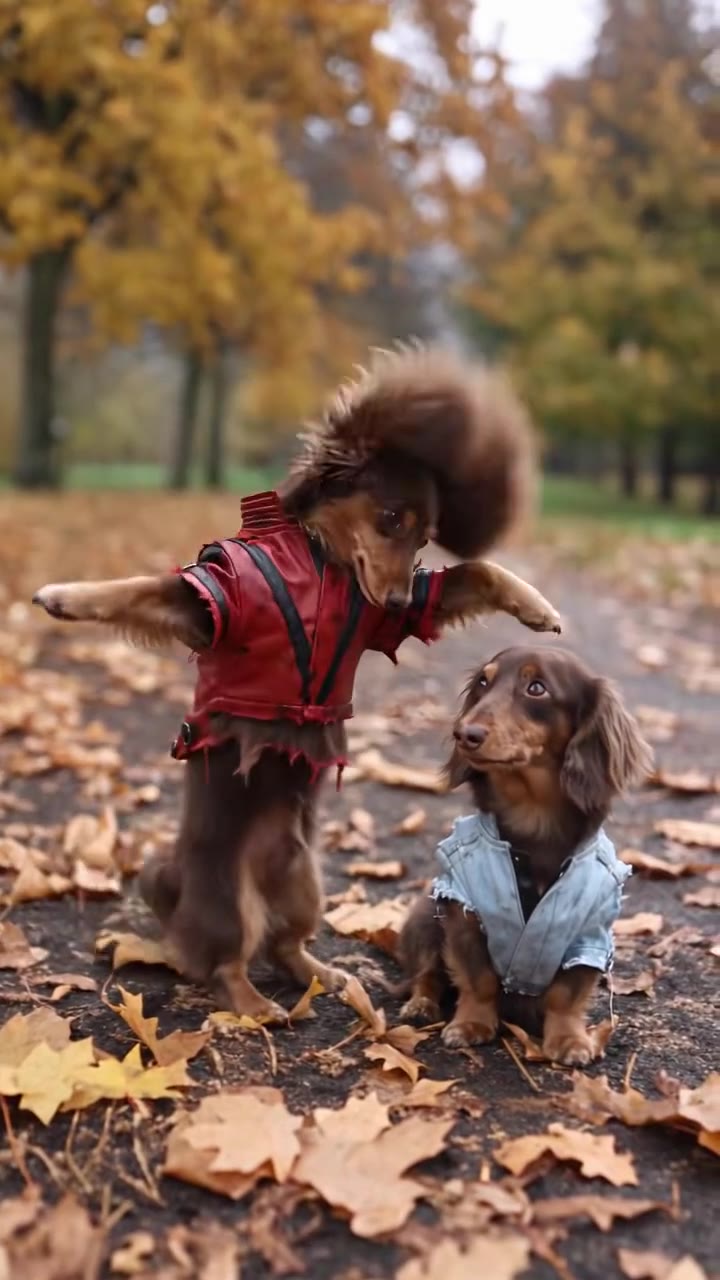
Two dachshunds in Thriller costumes dance in the leaves
Original post by @king_odiee
- Example
A cat in a creepy doll costume walks the street
Original post by @meowtakeover
- Example
Little Red Riding Hood, cat edition
Original post by @meowtakeover
- Example
A parrot gets ready for Halloween
Original post by @kennyslowbird
- Example
Cats perform the Thriller dance outside a haunted house
Original post by @moonwalkcats
Tap a clip to play it with sound. Shown for reference; rights belong to the creator. Creators can ask us to remove a clip at any time. contact@oraclip.com
How to do the AI Halloween trend in 3 steps
The whole AI Halloween video takes about as long as choosing a costume. No editing app, no green screen and no dressing up required.
- 1
Upload one photo
A clear, well-lit photo where the face is visible. For a costume video, a full-body shot works best.
- 2
Pick a spooky trend
Choose ghost prank, skeleton dance, Ghostface look or pet costume. The prompt is filled in and you can edit every word.
- 3
Generate and post before October 31
Your AI Halloween video renders in a few minutes in 9:16. Download it and post it with the AI-generated label switched on.
AI Halloween costume videos for you, couples and pets
Use the generator as an AI Halloween costume try-on: describe the costume in the prompt (witch, vampire, mummy, sheet ghost) and your photo keeps your face. For couples, the zombie love story needs one photo of each partner. For pets, a photo of the whole animal gives the most natural costume.
Want an exact dance like Thriller? Add the dance clip as a reference on the Motion Control AI page and the moves are copied onto your photo.
Planning a group costume? Make one AI Halloween video per person with the same prompt and setting, then post them as a carousel or stitch them together. For a family video, a single photo with everyone in frame works best, and the prompt should say how many people there are so nobody is added or dropped.
Halloween AI video prompts you can copy
Paste one of these into the generator above, or use them as a starting point.
Haunted hallway
Candlelit hallway, a door creaks open by itself, the person turns slowly toward the camera, a shadow passes behind them.
Pumpkin patch dance
Golden-hour pumpkin patch, the person in a witch hat does a little spin and points at the camera.
Vampire reveal
Gothic castle window, lightning, the person smiles and reveals tiny vampire fangs.
Tips: make it spooky, not gory
Fog, candlelight, a slow head turn and a ghost in the background are scarier than blood. Gory or violent prompts may be blocked and are not suitable for most feeds.
The best AI Halloween video ideas build tension in the first two seconds and pay it off at the end: a sound in the hallway, a door that opens, a shadow, then the reveal. Keep the scene to one location, describe the light (moonlight, candles, a flickering bulb) and let the photo do the rest. If the result feels too dark, ask for warmer light or a funnier ending.
- Night scenes with one strong light source (moon, candle, phone screen)
- Suspense: a door opening, a shadow, a tap on the shoulder
- A clear photo of you or your pet, face visible
Avoid
- Blood, injuries or weapons aimed at people
- Photos of celebrities, strangers or minors
- Very dark photos where the face is hard to see
Fine-tune your video
Same prompt, full controls: switch the model, length or aspect ratio, attach a reference video, then generate.
AI Halloween video FAQ
How do I do the Halloween AI trend?
Upload one photo on this page, pick a Halloween trend (ghost prank, skeleton dance, Ghostface look or pet costume) and press Generate. Your AI Halloween video is ready in a few minutes.
What app is everyone using for AI Halloween videos?
Creators use different AI video tools. On Oraclip you can make every format on this page from one photo in your browser, with the cost shown before you generate.
How do people make those creepy AI videos?
They start from a photo and a prompt that describes a slow, suspenseful scene, or copy the motion of a reference clip with motion control AI.
Can I make the ghost filter prank from a photo?
Yes. Pick the Ghost prank preset. A photo taken at home makes the first seconds look like a real selfie video.
How do I get the Ghostface / Scream AI look in a video?
Pick the Ghostface look preset. It creates a 90s horror-movie scene with a masked figure in the background and keeps it suspenseful rather than violent.
Can I make an AI Halloween video of my pet?
Yes. Use a sharp photo of the whole animal and pick the Pet costume preset.
Is it too scary for kids?
The presets are spooky, not gory. Avoid blood and weapons in your prompt and check the video before you share it with younger viewers.
Is it free?
Generations use Oraclip credits and the exact cost is shown before you generate. See the pricing page for plans and credit packs.
Do I need to label it as AI?
Yes, turn on the AI-generated label on TikTok, Instagram or YouTube when you post.
More seasonal trends
Post your AI Halloween video before October 31
One photo, one spooky trend, a few minutes.