
Wan 3.0 Guide: Specs, Prompts and Credit Cost in Oraclip
Wan 3.0 guide: Alibaba’s #1 text-to-video model on Artificial Analysis, with specs, strengths, limits, prompt tips and credit costs for clips up to 30 seconds.
 Oraclip Team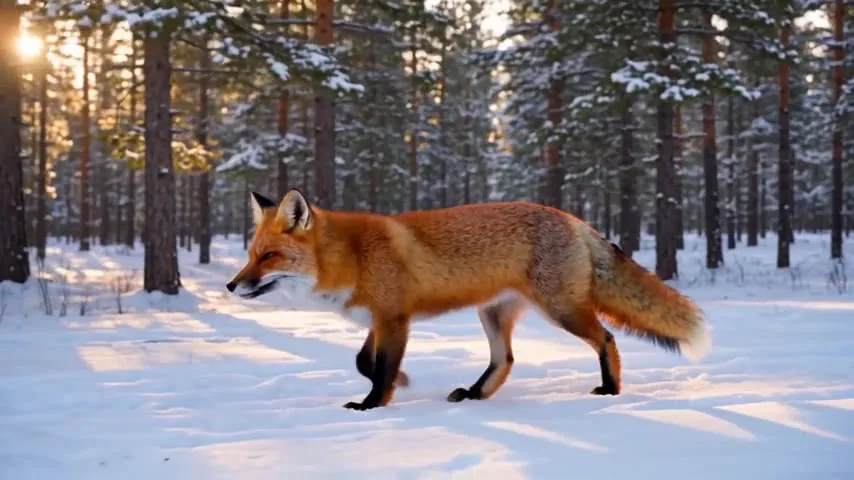
Wan 3.0 is Alibaba's newest AI video model, and on October 22, 2026 it sits at #1 on the Artificial Analysis text-to-video leaderboard. It makes up to 30 seconds of video with sound in one generation, from text or a starting image, at up to 1080p. This Wan 3.0 guide covers what the model is, what it does well and where it slips, how to prompt it, and what it costs in Oraclip, using Alibaba's own documentation and public leaderboards. Facts were checked on October 22, 2026.
What is Wan 3.0?
Wan 3.0 (Wan3.0 in Alibaba's docs) is the third generation of the Wan video models from Alibaba's Tongyi Lab. Alibaba opened a public beta on August 7, 2026 and made it generally available on August 24, 2026, when Reuters reported the launch. It is served through Alibaba Cloud Model Studio.
Alibaba's headline change is length. Wan 2.7 made clips of 2 to 15 seconds; Wan 3.0 doubles that to 30 seconds in a single generation, adds smart duration (the model picks a length that fits the prompt) and can extend an existing video. Alibaba also widened the inputs: besides text and images, the API accepts audio, video, documents (PDF, Word, slides, spreadsheets, Markdown and more) and web pages as source material.
Wan 3.0 specs: official vs in Oraclip
| Wan 3.0 (Alibaba) | Wan 3.0 in Oraclip | |
|---|---|---|
| Released | Beta August 7, GA August 24, 2026 | Available now |
| Clip length | Up to 30 s, smart duration, extension | 2 to 30 s |
| Resolution | 480P, 720P, 1080P | 480p, 720p, 1080p |
| Inputs | Text, image, audio, video, documents, web pages | Text, first frame, optional last frame |
| Aspect ratios | Several, including vertical | 16:9, 9:16, 1:1, 4:3, 3:4 or adaptive |
| Sound | Generated with the video | On by default, can be turned off |
| Price | $0.05, $0.10, $0.20 per second (480P/720P/1080P, Model Studio list price) | 76 credits per second at 480p, scaled by resolution |
Oraclip uses Wan 3.0 for text-to-video and first-frame (or first-and-last-frame) image-to-video. Multi-reference input, documents and video editing are Alibaba features that Oraclip does not expose yet.
How good is Wan 3.0? The leaderboard picture
Artificial Analysis runs blind preference votes between video models and publishes Elo scores. On October 22, 2026:
- Text-to-video (with audio): Wan 3.0 is #1 at 1,175, ahead of Utopai X (1,167), HeyGen (1,160), MiniMax H3 and Seedance 2.5 (both 1,158).
- Image-to-video: Wan 3.0 is #5 at 1,127. MiniMax H3 (1,140) and Seedance 2.5 (1,138) lead.
- Text-to-video without audio: Wan 3.0 is #2 at 1,134.
Read these as "Wan 3.0 is a top-tier model", not as "Wan 3.0 is always best". Gaps of 10 to 20 Elo points are small, the boards change every few weeks, and a model that wins on average can lose on your particular shot.
Wan 3.0 strengths
- Long single shots. Thirty seconds lets a scene breathe: a product turns, a character walks into frame, the camera finishes its move. Fewer clips to stitch.
- Text-to-video quality. The #1 text-to-video rank lines up with what we saw: in our red-fox test the fur, snow and low sunlight looked natural on the first take.
- Price per second. In Oraclip a 10-second 720p Wan 3.0 clip costs 760 credits, against 2,000 for Seedance 2.5 at 720p.
- 1080p output, which Seedance 2.5 does not offer in Oraclip.
Wan 3.0 weaknesses
Alibaba is open about two areas: audio texture and on-screen text accuracy are still maturing. In practice that means:
- Keep signs, captions and logos out of the prompt, or add them in editing.
- Listen to dialogue before you publish; ambience and effects are safer than long spoken lines.
- Image-to-video ranks lower than text-to-video, so for "animate this exact photo" jobs, also try MiniMax H3 or Seedance 2.5.
- In Oraclip, Wan 3.0 takes at most two images (first and last frame). For clips built from several reference images, a video or a voice track, use Seedance.
How to prompt Wan 3.0
Wan 3.0 follows plain descriptive prompts well. A structure that works:
- Subject and action: "A red fox trots through fresh snow".
- Setting and light: "in a quiet pine forest at sunrise, soft golden light".
- Camera: "gentle camera tracking shot", "slow orbit", "drone rises over the cliff".
- Sound: "wind and footsteps in snow, no music".
- Length: pick the duration in the composer rather than in the prompt; for 20 to 30 seconds, describe a beginning, middle and end so the model has something to fill the time with.
Things to avoid: long on-screen text, many characters doing different things, and several unrelated scenes packed into one clip. Our AI video prompt guide goes deeper on structure.
Wan 3.0 vs other video models in Oraclip
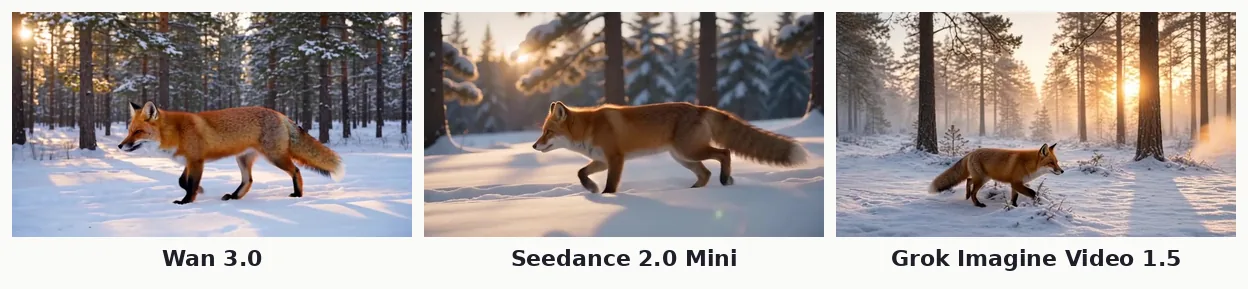
| Model | Best for | Length in Oraclip | Top resolution | 10 s at 720p |
|---|---|---|---|---|
| Wan 3.0 | Long text-to-video shots, 1080p | 2–30 s | 1080p | 760 credits |
| Seedance 2.5 | Reference-driven clips, editing | 4–30 s | 720p | 2,000 credits |
| MiniMax H3 | Faithful image-to-video | 5–15 s | 2K | 830 credits (768P) |
| Seedance 2.0 Mini | Budget reference clips | 4–15 s | 720p | 420 credits |
| Grok Imagine Video 1.5 | Cheap drafts | 1–15 s | 720p | 230 credits |
For a closer look at the two budget options, see the Seedance 2.0 Mini guide and the Grok Imagine Video 1.5 guide. If you are weighing Wan 3.0 against Topview's new T1 model, read Topview T1 vs Seedance 2.5 vs Wan 3.0.
What Wan 3.0 costs in Oraclip
| Length | 480p | 720p | 1080p |
|---|---|---|---|
| 5 s | 190 credits | 380 credits | 760 credits |
| 10 s | 380 credits | 760 credits | 1,520 credits |
| 15 s | 570 credits | 1,140 credits | 2,280 credits |
| 30 s | 1,140 credits | 2,280 credits | 4,560 credits |
The exact cost shows before you generate, and failed generations are refunded. Plans and credit packs are on the pricing page.
How to use Wan 3.0 in Oraclip
- Open the Wan 3.0 AI video generator, or the full creator and choose Wan 3.0 in the video model menu.
- Write the scene, or start from one of the ready-made scenes on the Wan 3.0 page.
- Optional: add a photo to use as the first frame. In the full creator you can add a last frame too.
- Pick the length (2 to 30 seconds), resolution and aspect ratio. Turn sound off if you plan to add your own.
- Generate. The clip lands in your library, ready to download.
Wan 3.0 FAQ
Is Wan 3.0 free?
Alibaba charges for the API, and Oraclip charges credits per second. Signing up for Oraclip is free; a 5-second Wan 3.0 clip starts at 190 credits at 480p.
How long can a Wan 3.0 video be?
Up to 30 seconds in one generation. In Oraclip you can choose anything from 2 to 30 seconds.
Is Wan 3.0 open source?
No. Earlier Wan releases up to Wan 2.2 were published with open weights, but Alibaba ships Wan 3.0 only through its hosted Model Studio API. As of October 22, 2026 there are no official Wan 3.0 weights to download.
Is Wan 3.0 better than Seedance 2.5?
For text-to-video it ranks higher on Artificial Analysis (1,175 vs 1,158) and costs fewer credits per second in Oraclip. Seedance 2.5 ranks slightly higher for image-to-video and accepts far more reference material, so it is still the better choice for reference-heavy work.
Does Wan 3.0 support 1080p?
Yes. Wan 3.0 renders 480p, 720p or 1080p, and all three are available in Oraclip.
Can Wan 3.0 make vertical videos?
Yes. Pick 9:16 in the composer for Reels, TikTok and Shorts.
Try Wan 3.0
The quickest way to judge Wan 3.0 is to run one of your own prompts on it. Open the Wan 3.0 generator, write a scene and compare it with Seedance 2.0 Mini or Grok Imagine Video 1.5 in the same picker.
Sources (checked October 22, 2026): Alibaba Cloud: Alibaba unveils Wan3.0 · Alibaba Cloud: Wan3.0 at general availability · Alibaba Cloud Model Studio: wan3.0-video · Reuters: Alibaba launches Wan3.0 · Artificial Analysis: text-to-video leaderboard · Artificial Analysis: image-to-video leaderboard