
Canva Craft vs GPT Image 2.5 vs Nano Banana 2.1: Ranks, API, Cost
Canva Craft vs GPT Image 2.5 vs Nano Banana 2.1: Canva’s new image model’s DesignArena rank, what is verified, API access and cost, and which model to use.
 Oraclip Team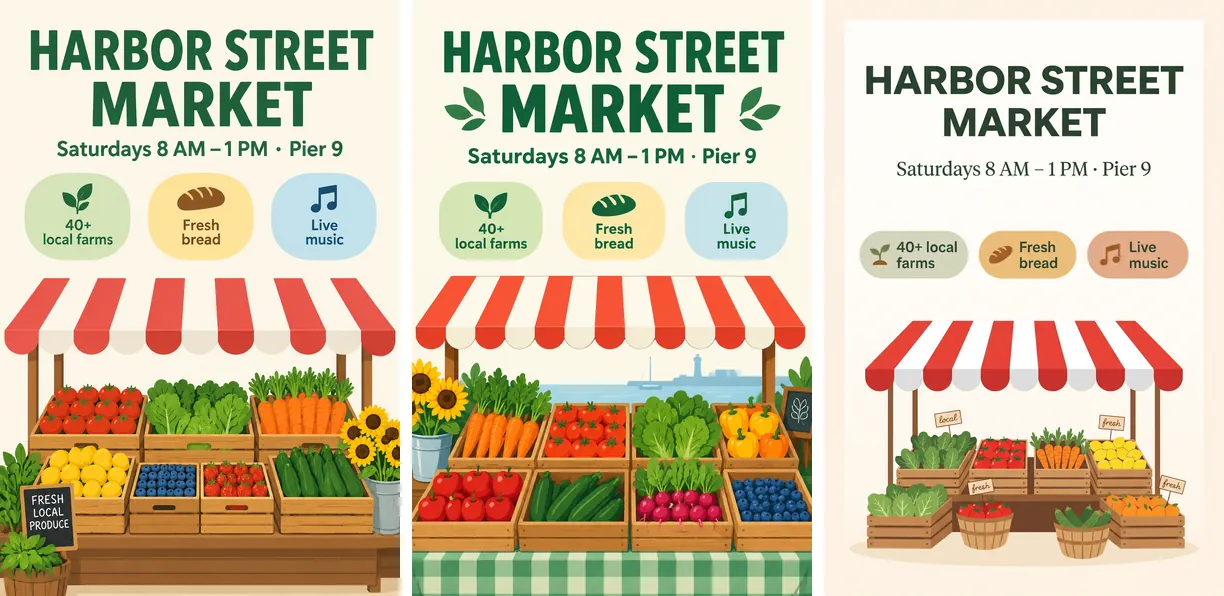
Canva Craft vs GPT Image 2.5 vs Nano Banana 2.1 is this week's big image-model question. Canva launched Craft, its first in-house image model, on October 22, 2026, and it entered the DesignArena leaderboard at #4, just behind three OpenAI models. GPT Image 2.5 and Nano Banana 2.1 are the two models most designers will measure it against. This guide covers what Craft is, what is verified and what is still Canva's own claim, how the three compare on rankings, access and cost, and which one to use today. Facts were checked on October 23, 2026.
Canva Craft vs GPT Image 2.5 vs Nano Banana 2.1 at a glance
| Canva Craft | GPT Image 2.5 (Sunburst / Flare) | Nano Banana 2.1 | |
|---|---|---|---|
| Made by | Canva Research | OpenAI | |
| Released | October 22, 2026 | September 8, 2026 | October 6, 2026 |
| DesignArena image, overall (Oct 23) | #4, 1,341 | #1, 1,407 / #2, 1,382 | #10, 1,291 |
| DesignArena votes behind the score | 1,303 | 11,367 / 11,810 | 3,617 |
| Largest size | 2K | 4K in Oraclip | 4K in Oraclip |
| Aspect ratios | 30+ in Dream Lab, 6 in the API | 8 in Oraclip | 10 in Oraclip |
| Reference images | Not yet (Canva says "coming") | Up to 16 in Oraclip | Up to 10 in Oraclip |
| Where to use it | Canva Dream Lab, Canva API (preview) | Oraclip, OpenAI, API resellers | Oraclip, Google, API resellers |
| Cost | Canva AI allowance (free plan has limits) | 31 / 51 / 81 credits at 1K / 2K / 4K in Oraclip | 21 / 31 / 46 credits in Oraclip |
DesignArena is a crowdsourced, blind side-by-side vote. Rankings move daily; the table shows the leaderboard updated October 23, 2026, 10:07 AM (UTC+8).
What is Canva Craft?
Craft is the first image model built and trained from scratch by Canva Research. Canva's announcement describes a two-stage design:
- Planning first. A planning model reads the prompt and writes a layout plan: which elements appear, where they sit, how big they are, the visual hierarchy and any text in the image.
- Then rendering. A second model turns that plan into an image at up to 2K, in more than 30 aspect ratios or a custom one.
- Trained on designs, not just photos. Canva says the training data includes millions of human-made templates from its library: posters, social posts, presentations, infographics and menus.
- Text in 55 languages, prompts in any language.
- Editable output. Craft images work with Canva's Magic Layers, which turns a flat image into separate, editable text and objects. Magic Layers is a separate tool and uses the same AI allowance.
Canva says the first version still needs work on fine print and technical drawings, and that faster, cheaper variants called Craft-fast and Craft-ultrafast are coming, with no date.
What is verified about Canva Craft, and what is not
Verified:
- The ranking. Craft is #4 of 83 models on DesignArena's image leaderboard (1,341 Elo), behind GPT-Image-2.5 Sunburst, GPT-Image-2.5 Flare and GPT Image 2. That makes Canva the #2 image lab there, the line in its launch post.
- Subcategory strength. On October 23 Craft was #1 for Landscape, #2 for Abstract, #3 for Portrait, #4 for Product and Architecture, and #6 for Marketing.
- Free access. Craft is in Dream Lab for every Canva user, including the free plan, within Canva's AI usage limits.
- The API. Canva's REST API has a
craft_v1_2kmodel on its image generation endpoint.
Not verified, or weaker than the headlines:
- Small sample. Craft's score rests on 1,303 votes with a ±2.6% margin. GPT Image 2.5 Sunburst has more than 11,000. Expect the rank to move as votes come in.
- Rank drift. Canva's launch post said Craft was #1 for People & Portraits. A day later it was #3 for Portrait, just behind both GPT Image 2.5 models.
- Typography. Text is Craft's headline pitch, yet we could not find it in DesignArena's Typography subcategory, where GPT Image 2 and GPT Image 2.5 Sunburst lead. Its Marketing rank (#6) also trails all three OpenAI models.
- Internal evaluations. The 25,000 head-to-head pairs judged by Canva's designers are Canva's own test, not an independent one.
- The buzz. Of about 7,000 X posts mentioning "Canva Craft" in its first eight hours, fewer than 200 were original posts. The rest were reposts, mostly of Canva's own launch video. Early write-ups lean on the announcement: Kingy AI says plainly it has not run its Craft tests yet, and Choosely labels its piece an early assessment based on documentation and launch reporting.
None of this means Craft is weak. A #4 debut from a first model is a strong start. It means the evidence today is a young leaderboard entry and a launch post.
Canva Craft API: availability and price
Craft is on Canva's REST API as craft_v1_2k (POST /v1/image-generations), but it is not a normal pay-per-image API:
- It is a preview API, with possible breaking changes, and public apps that use it cannot pass Canva's app review.
- Every call runs on behalf of a Canva user (OAuth,
asset:writescope) and uses that user's Canva AI credits. There is no published per-image price for developers. - It is rate-limited to 20 requests per minute per user, and Canva says a Craft job takes about 50 to 60 seconds. DesignArena measured a 54-second average.
- The API offers six aspect ratios today (square, 16:9, 9:16, 3:2, 2:3, 4:5), not the 30+ in Dream Lab.
As of October 23, 2026, Craft is not listed on fal, Kie or EvoLink, and it is not in Oraclip.
One design prompt on GPT Image 2.5 and Nano Banana 2.1
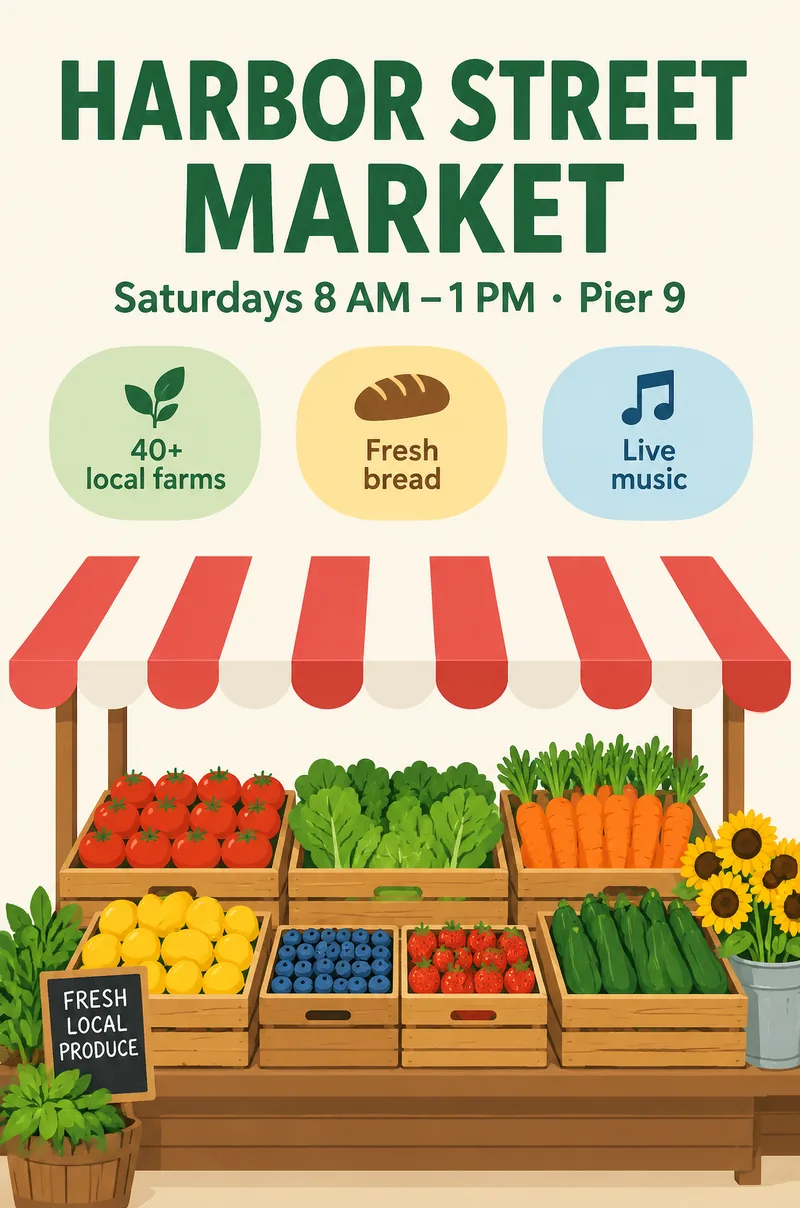
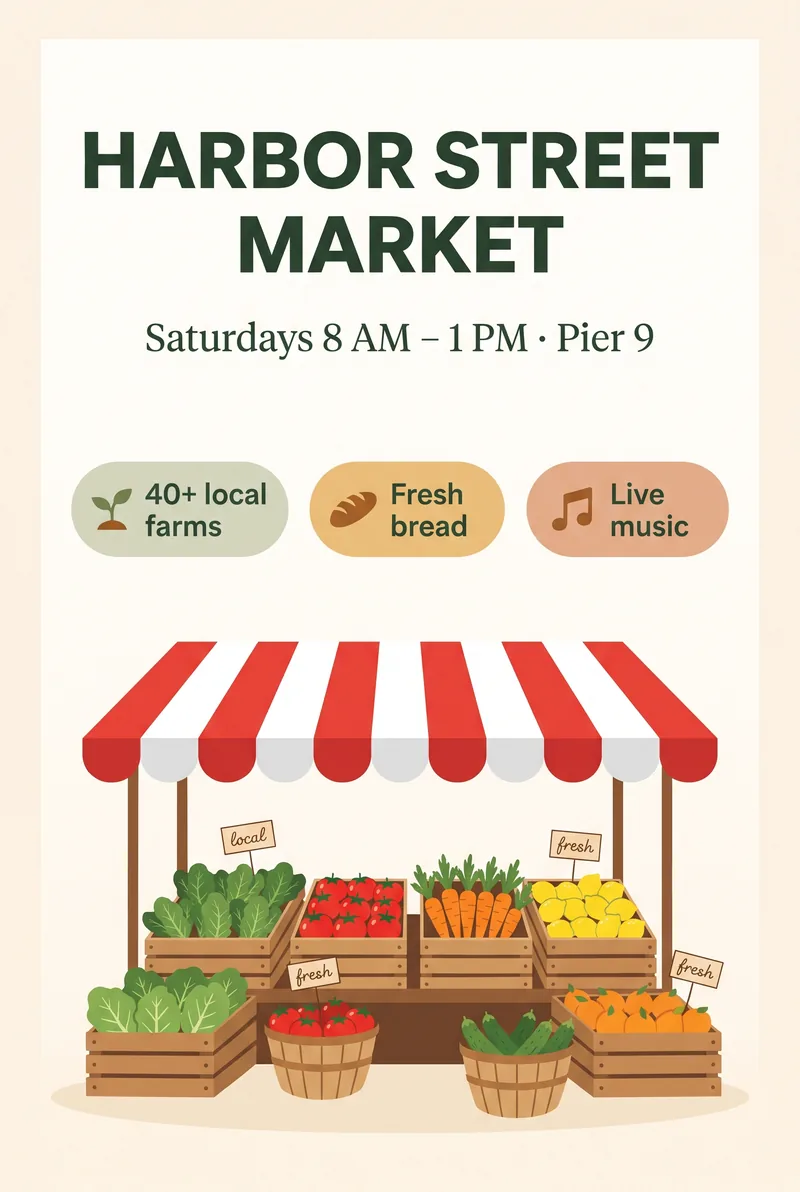
Craft's pitch is design work, so we wrote a flyer prompt with exact text, three labelled badges and a set layout, and ran it on the two Craft alternatives in Oraclip at 2K, 2:3, first take, no edits:
A clean, modern flyer for a fictional weekend farmers market, portrait layout. Headline at the top in bold dark green capital letters: "HARBOR STREET MARKET". Below it a smaller line: "Saturdays 8 AM – 1 PM · Pier 9". In the middle, three rounded callout badges in a row with simple icons, labelled "40+ local farms", "Fresh bread" and "Live music". A bright flat illustration of fruit and vegetable crates under a red and white striped awning fills the lower half. Cream background, generous white space, aligned grid, no people.
What stood out:
- Text: all three spelled the headline, the time line and the three badges correctly, including the en dash and the middle dot.
- Extras nobody asked for: Sunburst added a "FRESH LOCAL PRODUCE" chalkboard sign, Flare painted a harbor and lighthouse behind the stall, and Nano Banana 2.1 added small "local" and "fresh" tags to the crates.
- Layout: Nano Banana 2.1 left the most white space and the calmest grid, the closest to a template. Both GPT Image 2.5 models filled the lower half edge to edge with a richer, busier stall.
- Wait: Nano Banana 2.1 took 55 seconds; Sunburst 122 and Flare 159 in this run, about the same as Craft's reported 50 to 60 seconds.
Craft is not in this test because its API only runs through a Canva user's account. Paste the same prompt into Dream Lab to compare it yourself.
Which should you use?
- You design in Canva and want editable layers: try Craft in Dream Lab. It is free to start, and Magic Layers turns its output into editable text and objects in the same tool.
- Text-heavy posters, menus and ads: GPT Image 2.5 Sunburst. It leads DesignArena overall, for Marketing and near the top for Typography, with a much larger vote count behind it.
- Fast drafts at the same quality tier: GPT Image 2.5 Flare, #2 overall on DesignArena.
- Template-like layouts, large prints or a lower price: Nano Banana 2.1, 21 credits at 1K and 46 at 4K in Oraclip, twice Craft's 2K maximum.
- Your own references (a product, a logo, a character): GPT Image 2.5 (up to 16 images) or Nano Banana 2.1 (up to 10) in Oraclip. Craft does not take reference images yet.
- An API you can pay for directly: GPT Image 2.5 and Nano Banana 2.1. Craft's API bills a Canva user's allowance and is still a preview.
How to run the Canva Craft alternatives in Oraclip
- Open the Oraclip creator.
- Pick GPT Image 2.5 Sunburst, GPT Image 2.5 Flare or Nano Banana 2.1 in the image model menu.
- Paste your prompt, add reference images if you have them, choose 1K, 2K or 4K and an aspect ratio.
- Generate and download. Want it to move? Turn the image into a clip with image to video. Failed generations are refunded.
Canva Craft vs GPT Image 2.5 vs Nano Banana 2.1 FAQ
Is Canva Craft better than GPT Image 2.5?
Not on DesignArena so far. GPT Image 2.5 Sunburst (#1, 1,407) and Flare (#2, 1,382) rank above Craft (#4, 1,341) overall, and Sunburst leads Craft in most subcategories. Craft ranks first for Landscape and sits close behind for Portrait and Abstract.
Is Canva Craft better than Nano Banana 2.1?
On DesignArena, yes: #4 overall against #10, and ahead in every subcategory we checked except Cartoon (and Typography, where Craft is not listed yet). Nano Banana 2.1 renders larger (4K), takes up to 10 reference images and is available through ordinary APIs.
Is Canva Craft free?
Yes, within limits. Every Canva user, including the free plan, can use Craft in Dream Lab, subject to Canva's AI usage allowance. Magic Layers uses the same allowance.
Does Canva Craft have an API?
Yes, in preview: craft_v1_2k on Canva's image generation endpoint. Calls run on behalf of a signed-in Canva user and spend that user's AI credits; there is no published per-image price. Craft for AI assistants through Canva's MCP server is listed as coming soon.
Can I use Canva Craft in Oraclip?
Not yet. Craft is not offered by the API providers Oraclip uses. GPT Image 2.5 and Nano Banana 2.1 are in Oraclip today.
What resolution does Canva Craft make?
Up to 2K, in more than 30 aspect ratios in Dream Lab, or a custom ratio. The API currently lists six ratios.
Try the alternatives today
Craft is a strong first model and worth a try if you already work in Canva. For the top-ranked model on the same leaderboard, reference images, 4K output and an API, run GPT Image 2.5 or Nano Banana 2.1 in Oraclip. For the wider field, read the best AI image models and the GPT Image 2.5 guide.
Sources (checked October 23, 2026): Canva: Introducing Canva Craft · Canva on X: Craft launch · Canva Developers: Create image generation job · Canva Developers community: Craft in the Connect API · DesignArena: image leaderboard · TechCrunch: Canva releases its first image generation model · The Verge: Canva's first AI image model plans designs before generating them · The Rundown: Canva Craft tutorial · Kingy AI: Canva Craft vs ChatGPT · Choosely: Canva Craft explained · OpenAI: Introducing ChatGPT Images 2.5