
 Made with Oraclip
AI Doorbell Camera Video Generator for Halloween Pranks
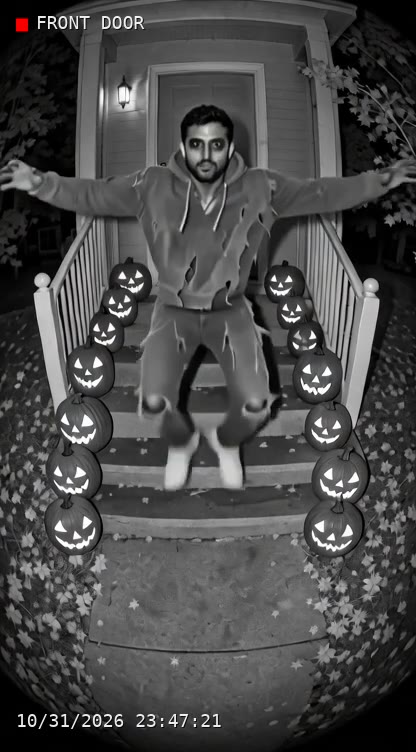
Turn a photo into a clip that looks like it came from a front-door camera: fisheye lens, night vision, porch sounds and a ticking timestamp. Dance on the porch in costume, prank your family as a mysterious visitor, or catch your dog ringing the bell.
Make a doorbell cam clip
Pick who comes to the door and what happens. We film it like a porch camera; you set the camera name and timestamp.
2 · Who is at the door?
1 · Your photo
3 · What happens
Costume (optional)
4 · Camera · Mood
5 · Quality · Ratio
You only pay for what renders. A step that fails is refunded automatically. See plans
Use your own photo, or one you have the right to use. No public figures, and no one under 18 without a parent or guardian.
AI doorbell camera examples
All made with this page from AI-generated example photos. Real doorbell clips belong to the homeowners who filmed them, so we only show our own.
- Made with Oraclip
A visitor in your own costume (Fast)
Made with Oraclip · Fast · Grok Imagine 1.5 480p
- Made with Oraclip
Dog rings the doorbell (Fast)
Made with Oraclip · Fast · Grok Imagine 1.5 480p
- Made with Oraclip
Vampire porch dance (Fast)
Made with Oraclip · Fast · Grok Imagine 1.5 480p
- Made with Oraclip
Vampire porch dance (Std)
Made with Oraclip · Std · Seedance 2.0 Mini 480p
Tap a clip to play it with sound. All examples were made on Oraclip from AI-generated photos; no real people or real homes are shown. contact@oraclip.com
How to make a fake doorbell camera video
No camera, no porch needed.
- 1
Pick who comes to the door
You (from a photo), your pet (from a photo), or a wild animal like a raccoon, a bear or an angry goose that needs no photo.
- 2
Choose the scene and mood
Porch dance, a visitor prank in your own costume, trick-or-treat, a candy thief, a dog ringing the bell or a package heist. Funny is the default; switch to Spooky for a jump scare.
- 3
Pick the camera look
Night vision (black-and-white infrared), porch light or daytime. Every clip has the fisheye lens, the fixed high angle and real outdoor sound of a front-door camera.
- 4
Set the overlay and download
Name the camera and set the date and time; the page burns them into the video when you download. There is no AI badge on the clip, so please label it as AI when you post.
What it costs
You see the total before you start. A failed step is refunded.
| Length | Fast 480p | Std 480p | HD 720p |
|---|---|---|---|
| 8 s | 211 | 390 | 810 |
| 10 s | 251 | 480 | 1,010 |
Fast without a photo (animals) is 21 credits less. Adding the camera name and timestamp is free.
Doorbell camera videos and AI: keep it fun
Ring- and Nest-style doorbell footage is everywhere on TikTok, and AI clips of animals on porches have fooled millions. This page is for pranks and Halloween fun with your own photos. Tell people it is AI when you share it, and never use a clip to scare someone for real, fake a crime or make someone look bad.
How to spot an AI doorbell video
Look for text that melts, hands and paws that change shape, objects that pop in and out and shadows that don’t match. Real doorbell clips also have motion-triggered starts and stutters.
Photos that work best
- Full body, standing
- Face clear, front or side
- Pets standing on four legs
- Your own costume photo
Skip
- Close-up selfies
- Group photos
- Neighbors or strangers
- Anything to scare someone for real
AI doorbell camera video FAQ
How do I make an AI doorbell camera video?
Pick who comes to the door, add a photo if it is you or your pet, choose a scene, the camera look and the mood, and press Make. When the clip is ready, set the camera name and timestamp and download it.
How many credits does it cost?
8 s: 211 credits Fast, 390 Std or 810 HD. 10 s: 251 / 480 / 1,010. Fast without a photo is 21 credits less. Failed steps are refunded.
Does it look like a Ring or Nest camera?
It copies the general look of a front-door camera: fisheye lens, high fixed angle, night vision and compression noise. It never shows a brand logo or a real app interface.
Can I add a timestamp?
Yes. The model never draws text; the page adds a camera name and a ticking date and time that you choose, and burns them into the downloaded video.
Can I make one with my dog?
Yes. Pick My pet, upload a photo and choose a scene like Rings the bell, Pet trick-or-treat, Package heist or Sniffs the camera. You can add a small costume too.
Do I need a photo?
Only for you or your pet. Wild animal scenes (raccoon, bear, goose, capybara) are made from text alone.
Is it OK to post these?
Yes, for fun, with your own photos, and labeled as AI. Don’t use them to frighten someone for real, fake a crime, or show other people without their consent.
More Halloween AI tools
Make your porch cam prank
One photo, a front-door camera look, a timestamp you choose.