
 Made with Oraclip
AI Costume Changer: Try On a Halloween Costume, Then Watch the Change
Upload one photo, pick a costume (or type your own) and see the look first. Like it? Animate it: you snap, spin or vanish in smoke and come back in costume, same face, same room. Works for one person, a couple or your pet.
AI costume change examples
All made with this page from AI-generated example photos. We don’t re-host other people’s costume videos: the ones online are app ads or have unclear rights.
- Made with Oraclip
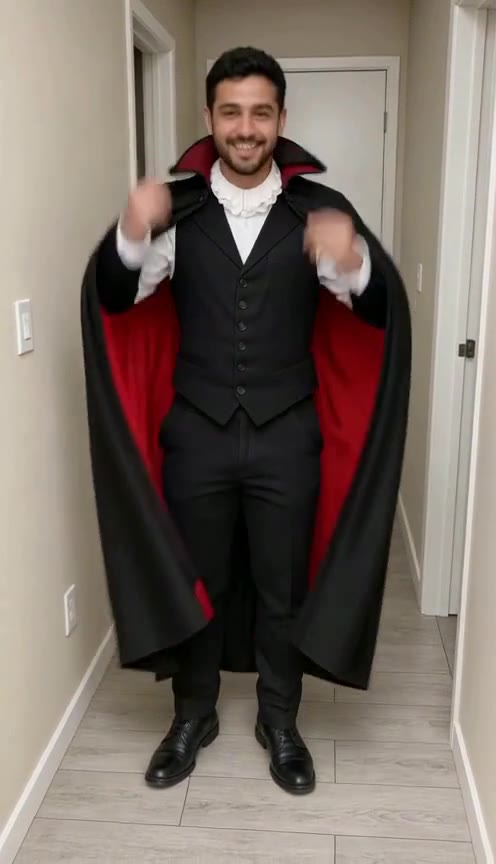
Spin into a vampire (Fast)
Made with Oraclip · Fast · Seedance 1.5 Pro 480p
- Made with Oraclip
Snap into a witch (Fast)
Made with Oraclip · Fast · Seedance 1.5 Pro 480p
- Made with Oraclip
Pet witch in a puff of smoke (Std)
Made with Oraclip · Std · Seedance 2.0 Mini 480p
Tap a clip to play it with sound. All examples were made on Oraclip from AI-generated photos; no real people are shown. contact@oraclip.com
How to change your costume with AI
Four steps, no editing app.
- 1
Add one clear photo
Full body or waist up, face visible, good light. One person, two people for a couples costume, or your dog, cat or bunny.
- 2
Pick a costume or type one
Witch, vampire, skeleton glam, zombie, werewolf, pumpkin head, ghost bride or mummy, plus small costumes for pets. Or type your own idea, like “pirate captain” or “80s rock star”. Pick two for a double change.
- 3
Check the look, redo once for free
We dress you up in a still first, keeping your face, pose and room. Not quite right? Redo it once at no cost before you animate.
- 4
Animate the change
Pick an effect (snap, spin, swipe, smoke or flash) and the video goes from your photo to the costume in one shot, with sound. Download it for TikTok, Reels or Shorts.
What it costs
One price for the whole thing: the look still, one free redo and the video. A failed step is refunded.
| Video | Fast 480p | Std 480p | HD 720p |
|---|---|---|---|
| 1 costume · 5 s | 230 | 290 | 570 |
| 2 costumes · 8 s | 273 | 470 | 910 |
You pay 21 credits per look up front and the rest when you animate. A second redo costs 21 credits.
Costume ideas that work well
Costumes with a clear shape and color read best on video: a witch hat and cape, a vampire collar, skeleton face paint. Masks that cover the whole face (pumpkin head) are always the second look, so the video starts on your real face.
Couples can match (vampire + vampire) or pair up (witch + werewolf). Pets look best in small, simple costumes: a pumpkin suit, a witch hat, bat wings or a dinosaur hoodie.
Want the morph without a costume?
The Magic Transformation effect turns a photo into a reveal or morph clip without a costume change.
Photos that change best
- Full body or waist up
- Face clear and lit
- Plain room or outdoors
- Pets standing or sitting
Skip
- Tiny faces in group shots
- Heavy filters or sunglasses
- Someone else’s photo without asking
- Children without a parent’s OK
AI costume changer FAQ
How do I change my costume in a photo with AI?
Upload a photo, pick a costume or type one, and press See my look. You get a still of you in the costume with your face, pose and background kept. If you like it, press Make the video to animate the change.
How many credits does it cost?
One costume, 5 s: 230 credits Fast, 290 Std or 570 HD. Two costumes, 8 s: 273 Fast, 470 Std or 910 HD. That includes the look still and one free redo. Failed steps are refunded.
Can I try on a costume for my dog or cat?
Yes. Pick Pet and choose a pumpkin, little witch, bat wings or dinosaur costume. The pet keeps its face and markings.
Can we do a couples costume?
Yes. Pick Couple and upload a photo of both of you. You both get the same costume theme, or type a pair like “witch and werewolf”.
What costumes can I type?
Almost anything family-friendly: jobs, monsters, movie-style looks without logos, eras like “1920s flapper”. We don’t make swimwear, underwear, see-through or revealing outfits, gore, weapons or real people.
Will it still look like me?
The look keeps your face, hair, pose and room, and the video starts from your real photo. Face-covering costumes always come second so the clip starts on you.
What is the difference between Fast, Std and HD?
Fast is 480p and the quickest: one 5 s change or an 8 s double change. Std is 480p with smoother motion. HD is 720p. One or two costumes are available on every tier.
More Halloween AI tools
Try on your Halloween costume today
One photo, any costume, a transformation video in minutes.