
 Made with Oraclip
Baby Dragon AI: A Tiny Dragon Wakes Up in Your Hands
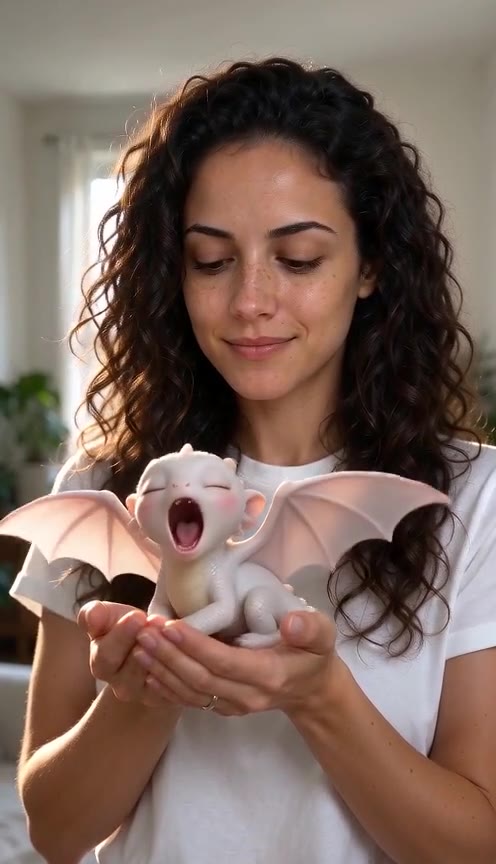
The baby dragon videos all over X and TikTok, starring you. Upload one photo and a kitten-sized dragon curls up in your hands, wakes, yawns, stretches its little wings and sneezes a tiny puff of smoke, in an 8-second vertical clip with sound.
Make your baby dragon video
Add one clear photo of you, pick a scene and generate. The dragon, its size and colours, the moves and the sound are already in the prompt.
1 · Add a photo of you
2 · Pick a scene
3 · Pick a quality and generate
Only upload a photo of yourself or an adult who said yes. One adult per photo, never a photo of a child. The clip is AI-made; label it as AI when you post it. There is no free preview: every render uses credits. Failed renders are refunded automatically. See plans
What is the baby dragon AI video?
A short AI video of a person with a tiny dragon: it wakes up in their cupped hands, yawns, stretches its wings and sneezes a puff of smoke, or it gets tangled in knitting wool and ends up wearing a scarf. In late October 2026, Seedance 2.5 clips of a young woman and a pink-white baby dragon reached X’s news page three times (October 25, 26 and 30).
This page makes that clip with you in it: your photo is the reference for your face and look, and the dragon is our own design, the same size and colours in every scene.
Your clip, second by second (Wakes in your hands)
- 10–2 s: the dragon is curled up asleep in your hands.
- 22–4 s: it opens its eyes, yawns and stretches its wings.
- 34–6 s: it sits up and nuzzles your thumb.
- 46–8 s: it sneezes a tiny puff of smoke to the side and you laugh.
Baby dragon AI video examples
Clips made on this page, then baby dragon clips from around the web, credited to their creators.
- Made with Oraclip
Made with Oraclip · Wakes in your hands
Based on the trend by @mehwishkiran07
- Made with Oraclip
Made with Oraclip · Snow day
Based on the trend by @mehwishkiran07
- Example
A baby dragon restyles her hair (Seedance 2.5, per the post)
via @mehwishkiran07 · 20.7K views (Oct 30)
- Example
A day with a pet baby dragon (Seedance 2.5, per the post)
via @Alina_with_Ai · 1.2K views (Oct 30)
Tap a clip to play it with sound. Our two clips were made with Oraclip (Seedance 2.0 Mini) from one AI-generated photo. The other clips belong to their creators on X: re-hosted with credit and a link to the original post, and removed on request. contact@oraclip.com
How to make a baby dragon AI video
- 1
Add one clear photo of you
Front-facing, good light, no sunglasses. A waist-up photo gives the model the most to work with for your hands; a close selfie works too.
- 2
Pick a scene
Wakes in your hands (the classic), Cosy cottage scarf, Warms your cocoa or Snow day. Add a detail such as a different dragon colour if you like.
- 3
Generate
You get an 8-second vertical clip with sound in your Library, usually within a few minutes.
- 4
Post it
Add your own music in TikTok, Reels or Shorts and keep the AI label on.
Four baby dragon scenes
Pick one in the generator, or tap a card to load it.
Wakes in your hands
The classic: the dragon sleeps in your cupped hands, wakes, yawns, stretches its wings, nuzzles your thumb and sneezes a tiny puff of smoke.
Cosy cottage scarf
By the fireplace, you untangle the wool from its wing and wrap a tiny knitted scarf around its neck. It puffs out its chest and nuzzles your cheek.
Warms your cocoa
On a frosty morning the dragon breathes a soft warm glow into your mug, no flame, then rests its chin on your finger.
Snow day
In the falling snow it snaps at snowflakes, sneezes a puff of warm steam and curls up against your fingers. The winter and Christmas version.
Photos that work best
- One adult, face clear and front-facing
- Good, even light; no sunglasses
- Waist-up, with room for your hands
- Plain top or a cosy jumper
Weaker results
- More than one person in the photo (photos of children are never allowed)
- Hands or objects covering the face
- Hats, headphones or heavy filters
- Very dark or blurry photos
What goes wrong, and how to fix it
| Problem | Fix |
|---|---|
| Fingers merge with the wings or tail | Use a waist-up photo, or pick 720p. Results vary from run to run. |
| The face looks less like you | Use a sharper, front-facing photo in good light, without filters. |
| The dragon flies off or changes size | Pick Wakes in your hands and keep the extra detail short. |
| You want a different dragon | Add a colour in the detail box, e.g. “the dragon is mint green”. |
Fine-tune your video
Same prompt, full controls: switch the model, length or aspect ratio, attach a reference video, then generate.
Baby Dragon AI FAQ
How do I make the baby dragon AI video?
Upload one clear photo of you, pick Wakes in your hands, Cosy cottage scarf, Warms your cocoa or Snow day and press Generate. You get an 8-second vertical clip with sound in your Library.
How many credits does it cost?
An 8-second clip costs 390 credits with Seedance 2.0 Mini at 480p (the default) or 810 at 720p. Your photo is a free input. Failed renders are refunded automatically.
Is there a free preview?
No. Every render runs a paid video model, so there is no free preview. The examples on this page are free to watch.
Can I make it for free?
Signing up is free (no card) and new accounts get 100 credits, valid for 5 days (one grant per email). They cover images and a short test video: the cheapest clip is 20 credits, and Grok Imagine Video 1.5 makes up to 8 seconds at 480p for 100 credits. Chatting with the agent is free. Longer or higher-resolution videos need a plan or a one-time credit pack. The exact cost shows before every render, and failed renders are refunded.
Which AI made the viral baby dragon videos?
The clips on X’s news page in October 2026 were made with Seedance 2.5. This page uses Seedance 2.0 Mini, a faster, lower-cost model from the same family, with a prompt written for this trend.
What prompt makes a good baby dragon video?
Give the dragon a fixed size and colours (“the size of a kitten”), say your photo is only a reference for your face, name both hands with five fingers each, and split the 8 seconds into four short beats. The page writes this prompt for you; the guide shows the full structure.
Is it a dragon from a film?
No. Ours is our own design: a pearl-white baby dragon with blush-pink wings and amber eyes. We don’t make characters from films, shows or games.
Can I put my child or my pet in it?
No children: only upload a photo of yourself or an adult who said yes. This page is made for a person holding the dragon; for your pet, try Paws at You AI.
Does the video have sound?
Yes: the dragon’s chirps and squeaks, wing rustle, room sound and a soft laugh, with no music or speech. Add your own sound when you post.
Is the baby dragon real?
No. The clip is AI-generated for fun. Label it as AI if you post it publicly.
More trends
Hold your own baby dragon
One photo of you, an 8-second clip of a tiny dragon waking up in your hands.