
Reference Video Prompts: 4 AI Clips from X to Copy
Four reference video prompts from X with clips: a K-drama remake, a Kling 4.0 cliff-jump comedy, a one-take motorcycle chase and a 30s product ad.
 Oraclip Team
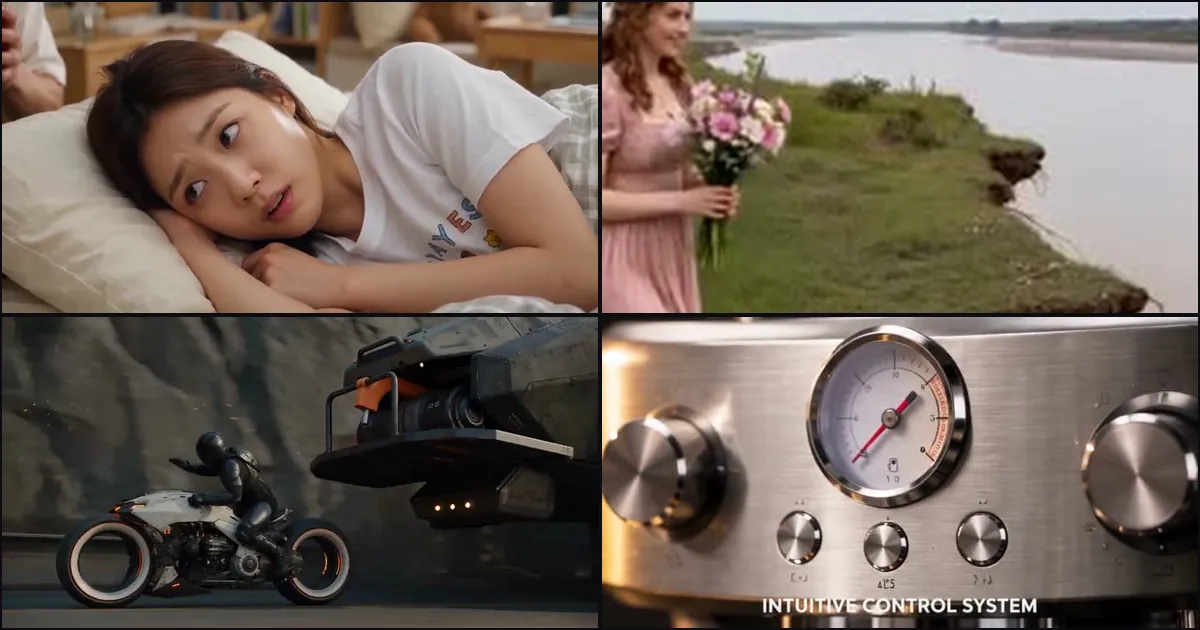
Search "reference video prompt" and you mostly get model docs and invented examples: "use @video1 for motion, @image1 for the person", with a stock clip of a mug or a gym routine. These four prompts were posted on X on November 11 and 12, 2026, each with the video it produced, and each is already in the Oraclip library: a K-drama romcom remade from a reference clip, a Kling 4.0 cliff-jump comedy that copies a reference video's camera and timing, a one-take motorcycle chase built around an uploaded bike, and a 30-second espresso ad made from a product still. For each one you get the creator, the original post, a short excerpt, what it does, and a deep link to run it.
Do it now: open the Seedance 2.5 generator → (it takes reference videos up to 30 seconds in total, plus images), or pick a prompt below and hit Try in Oraclip. To swap the person in an existing clip instead, see replace the person in a video and motion control AI.

What a reference video prompt needs
A reference video carries everything at once: the people, the place, the camera, the cuts and the pace. If the prompt doesn't say which parts to keep, the model guesses. All four creators below answer the same questions before they describe a single shot.
| Part | What it does | Example below |
|---|---|---|
| A role for every file | "Male Character: Image 1 … Motion & Camera Reference: Video 1" | cliff jump |
| What to keep from the video | storyline, camera choreography, editing rhythm, timing | romcom, cliff jump |
| What to keep from the image | "Preserve the uploaded ivory motorcycle… and black-armored adult rider" | motorcycle chase |
| A timed beat list | "Scene 1 (0–6 seconds)", "SHOT 3 — 5.000–7.500s" | romcom, espresso ad |
| Hard limits | "No slow motion, hovering, teleportation, duplicated actions, or extra characters" | cliff jump, espresso ad |
| Language and text | "Convert all spoken dialogue into natural, fluent English", exact on-screen captions | romcom, espresso ad |
1. K-drama noodle romcom from a reference clip, by @Zyrellix
"Create a 30-second cinematic Korean drama-style romantic comedy scene, inspired by the reference video. Maintain the same two main characters, facial features, hairstyles, outfits, realistic expressions, and original storyline. Scene 1 (0–6 seconds): A young woman is sleeping in a cozy bedroom while a young man quietly eats instant noodles nearby…" — @Zyrellix on X
What it does: a 30-second Seedance 2.5 remake of a short K-drama clip. The prompt keeps the story and the two characters from the reference and rewrites only what should change: five 6-second scenes, English dialogue with lip-sync, Korean subtitles removed. It is the cleanest pattern for "same scene, my language" remakes.
Run it on Oraclip: open the prompt page → Try in Oraclip with Seedance 2.5 and add your reference clip. Keep the IMPORTANT REQUIREMENTS list and change the scene lines to match your clip.
2. Cliff jump trampoline bridal catch, by @MeenakshiYACS

"Male Character: Image 1 / Female Character: Image 2 / Visual Reference: Image 3 / Motion & Camera Reference: Video 1. Create a 12-second vertical 9:16 cinematic 4K photorealistic comedy video. A man attempts three jumps at a cliff edge… Follow the reference video's camera choreography and editing rhythm." — @MeenakshiYACS on X
What it does: a 12-second Kling 4.0 physical comedy. The first four lines are a role map: two people, a look, and one video that supplies only motion and camera. The story then runs in order (three jumps, the collapse, the trampoline launch, the catch), and the CRITICAL list blocks the usual failures: slow motion, hovering, duplicated actions.
Run it on Oraclip: open the prompt page → Try in Oraclip. Oraclip runs Kling 4.0 from a first frame; to use a motion reference video, run the same prompt with Seedance 2.5 and keep the role map at the top.
Copy the @MeenakshiYACS prompt →
3. Ivory motorcycle drone chase one-take, by @umesh_ai

"ULTRA-PHOTOREALISTIC cinematic VFX, 15 seconds SCREEN TIME, ONE continuous take, fixed 24mm lens. Preserve the uploaded ivory motorcycle, exposed dark machinery, two hollow ring wheels, black saddle, amber accents and black-armored adult rider… All listed camera positions are successive movements of the SAME camera within the uninterrupted take." — @umesh_ai on X
What it does: a 15-second Seedance 2.5 one-take (made on Runway) built around one uploaded design. The opening sentence lists the parts of the bike that must not change, then the prompt walks the camera through numbered positions with timestamps, and even schedules two short slow-motion windows. Use it when the reference is an object, not a video.
Run it on Oraclip: open the prompt page → Try in Oraclip, upload your own vehicle or character as the image, and edit the Preserve the uploaded… sentence so it lists that design's details.
4. Espresso machine 30-second product ad, by @Strength04_X

"Create an exactly 30-second ultra-photorealistic premium product advertisement for an original, unbranded professional espresso machine… SHOT 2 — 2.500–5.000s: Extreme macro of the polished portafilter locking into place… ON-SCREEN CAPTION: 'PRECISION BREWING DESIGN'" — @Strength04_X on X
What it does: a two-step workflow. The creator first made a product still with GPT Image 2.6 (that prompt is in the same thread), then used it as the reference for a 30-second Seedance 2.5 commercial: twelve 2.5-second shots, each with its own caption, plus an audio line and a negative prompt that forbids logos, extra buttons and "fake pressure readings".
Run it on Oraclip: open the prompt page → Try in Oraclip, upload your product photo, and replace the PRODUCT DESIGN block and the captions. More ad structures are in AI product ad video prompts.
Copy the @Strength04_X prompt →
How to write your own reference video prompt
- Map every file first: "Image 1 = the man, Image 2 = the woman, Video 1 = motion and camera only".
- Say what to keep from the video: motion, camera path, timing, cuts or the whole storyline.
- Say what not to copy: the original people, background, text or language.
- Lock the design you uploaded: list the details that must stay the same.
- Write the beats in order, with seconds if the clip is longer than 10 seconds.
- Add hard limits: no extra characters, no duplicated actions, no logos.
- Generate on Oraclip. You see the credit cost before you run. Seedance 2.5 takes reference videos up to 30 seconds in total.
FAQ
What is a reference video prompt? It is a prompt that tells the model which parts of an uploaded clip to reuse (motion, camera path, timing, story) and which parts to replace with your own images. The four prompts above are working examples.
Which model can use a reference video on Oraclip? Seedance 2.5 takes reference videos up to 30 seconds in total, together with images. Kling 4.0 on Oraclip starts from a first frame, so use Seedance 2.5 when you need the motion or camera of a clip. See Kling 4.0 vs Seedance 2.5.
How is this different from replacing the person in a video? Replacing the person keeps the original clip and swaps one character. A reference video prompt makes a new clip that borrows only the parts you name. For swaps, read replace the person in a video.
Is it free? Oraclip shows the credit cost before you generate, so you always know the price first. Pricing is on each model page.
Where are more prompts like these? Browse motion-transfer prompts and motion-control prompts in the library, or read Seedance 2.5 prompts.