
Put Your Pet on Santa's Nice List: Dog and Cat Video Guide
Santa's nice pet list, made with AI: put your dog or cat in Santa's gold frame from one photo, with pet photo tips, two-pet ideas and captions.
 Oraclip Team
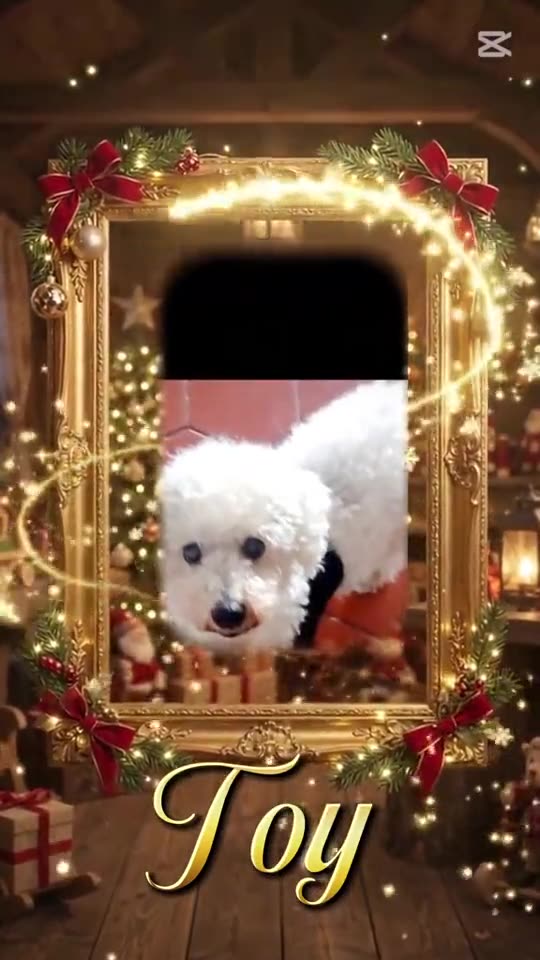
Every dog owner already knows the answer to "naughty or nice?". Santa's nice pet list is the Christmas trend that makes it official: Santa checks his scroll, nods, and your dog or cat appears in a gold picture frame in his workshop. This guide covers how to put your pet on Santa's Nice List with Oraclip's Santa Nice List AI page, which pet photos work best, how to include two pets or you and your pet together, and caption ideas for posting it.
Make it now: Put your pet on the Nice List →
Clip: @babytoy.com on TikTok, shown with credit.
Oraclip's page is its own AI version of the Santa Nice List trend, made from your photos. It is not the CapCut template, and Oraclip is not affiliated with CapCut, TikTok or the creators whose clips appear here.
What "Santa's nice pet list" means
The Santa Nice List trend began as a CapCut template on TikTok in November 2026: Santa unrolls a very long scroll labelled "Nice List", finds a name, nods, and a swirl of gold sparkles reveals a portrait in an ornate gold frame. People quickly started using it for their dogs and cats, which is where searches like "santa's nice pet list" and "dogs on santa's nice list" come from.
The pet version works because it is affectionate and a little ridiculous. Your dog that ate a sock last week is suddenly being honored by Santa himself, sitting on a red velvet cushion in a gilded frame.
With the AI version, the portrait is not a pasted still photo. Your pet is generated as a living portrait inside the frame: tilting its head, blinking, and for dogs, wagging. The clip is 10 seconds long, vertical (9:16), and comes with Christmas music already added.
How to put your pet on Santa's Nice List
- Open Santa Nice List AI.
- Upload your best pet photo to Photo 1.
- Leave the style on Pet on the Nice List. It is the default.
- Optionally add one short detail, such as "a red bow on the collar".
- Choose 480p (480 credits) or 720p (1,010 credits) and generate.
- Download the MP4 from your library and post it with your pet's name in the caption.
There is no free preview on this page; each render uses credits, the price shows before you generate, and failed renders are refunded automatically.
Which pet photos work best
The model only knows your pet from the photo you upload. It keeps the breed, face shape, fur color and markings from that photo, so a clear, well-lit picture is the single biggest factor in whether the portrait looks like your pet.
For dogs
- The whole head in frame, both eyes and both ears visible.
- Taken at the dog's eye level rather than from above.
- A calm moment: sitting or lying down, not mid-jump.
- Fur that is not hidden by a big coat or costume, unless you want the outfit in the portrait.
For cats
- A sharp face with both eyes open. Cats photographed mid-blink or in a dark corner often come out softer.
- Good light from a window. Black cats in particular need light on the face so the eyes and shape read.
- A plain background helps the model separate the cat from the sofa.
What to avoid
- Photos where a hand, toy or another animal covers part of the face.
- Very small pets far away in a room.
- Screenshots from old videos or heavy filters that change fur color.
- Several animals in one photo when you only want one in the frame.
If your favourite photo includes other things, crop it to just your pet's head and upper body before you upload.
Two pets, or you and your pet
The frame can hold more than one face:
- Two pets. Keep the Pet on the Nice List style and add the second pet to Photo 2. Use one animal per photo.
- You and your pet. Choose Duo in the frame, then upload yourself and your pet as two photos, or one photo of you together. The two of you appear side by side in the same gold frame.
More pairing ideas, including couples and best friends, are in the Santa Nice List video for couples and friends guide.
Pets on the Nice List: real examples
These remakes from TikTok show the pet version of the trend. They are shown with credit and a link to each original post.
Clip: @rosmaryjimenezdia on TikTok.
The red bow in that example is a good illustration of the optional detail field: one small, visible accessory is easy to add and makes the portrait feel festive without changing your pet.
Caption ideas for your Nice List pet
The clip deliberately has no name under the frame, so the caption does the work. Some ideas:
- "Checked twice. [Name] is officially on the Nice List."
- "Santa has clearly not heard about the sock incident."
- "Nice List 2026: [Name], very good dog."
- "Naughty? Never. (Please ignore the sofa.)"
- "The cat made the Nice List. We are as surprised as you."
- "Santa says [Name] gets extra treats this year."
Mention that the video was made with AI, and tag it with your usual pet and Christmas hashtags.
Ways to use the clip
- Christmas card. Send the video in a group chat or a family message instead of a static card.
- Pet account. A short, vertical, music-ready clip that fits TikTok, Reels and Shorts.
- Gift reveal. Post the Nice List clip, then a photo of the new toy or treat.
- A series. Make one for each pet in the house, then post them on consecutive days.
A quick safety and fairness note
Only upload photos of your own pet, or of adults who agreed. Do not upload children's photos: this page is for adults and pets only. If you want a costume look instead of a portrait, see the Grinch dog and cat costume ideas or the Grinch pet AI page.
FAQ
Can I put my dog on Santa's Nice List?
Yes. Upload a clear photo of your dog to Santa Nice List AI, keep the Pet on the Nice List style, and generate. Your dog appears as a living portrait on a red velvet cushion inside Santa's gold frame, with its own fur and markings.
Does it work for cats too?
Yes. Use a sharp, well-lit photo with both eyes open. The cat stays a real cat in the frame, with its own coat and face, and blinks and tilts its head rather than doing anything a cat wouldn't.
Can two pets be on the Nice List together?
Yes. Add the second pet to Photo 2, one animal per photo. For you and your pet together, choose the Duo in the frame style.
How much does a pet Nice List video cost?
A 10-second clip costs 480 credits at 480p or 1,010 credits at 720p with Seedance 2.0 Mini. The price shows before you generate, and failed renders are refunded automatically.
Will it look like my pet?
The photo is the identity reference: breed, face, fur color and markings are taken from it. Clear, front-facing photos look most like your pet. Every render is new, so watch it before you post.
Is this the CapCut Santa Nice List template?
No. The CapCut template places your photo into its own clip. This page generates a new video of the scene from your photo, with its own music, and is not affiliated with CapCut or TikTok.
More Christmas pet videos
- AI Christmas video generator: all Christmas templates.
- How to make a Santa Nice List video: the full step-by-step guide.
- Grinch pet AI: your pet with green fur and a Santa suit.
- Christmas pajama AI: your pet in matching pajamas.
Pet photo ready? Put your pet on Santa's Nice List.