
Hippo Pathway What If Trend: How to Make the Giant AI Video
How to make the Hippo Pathway What If video from one photo: you or your pet as a 100x giant pop star on a city avenue. 10-second clip from 480 credits.
 Oraclip Team
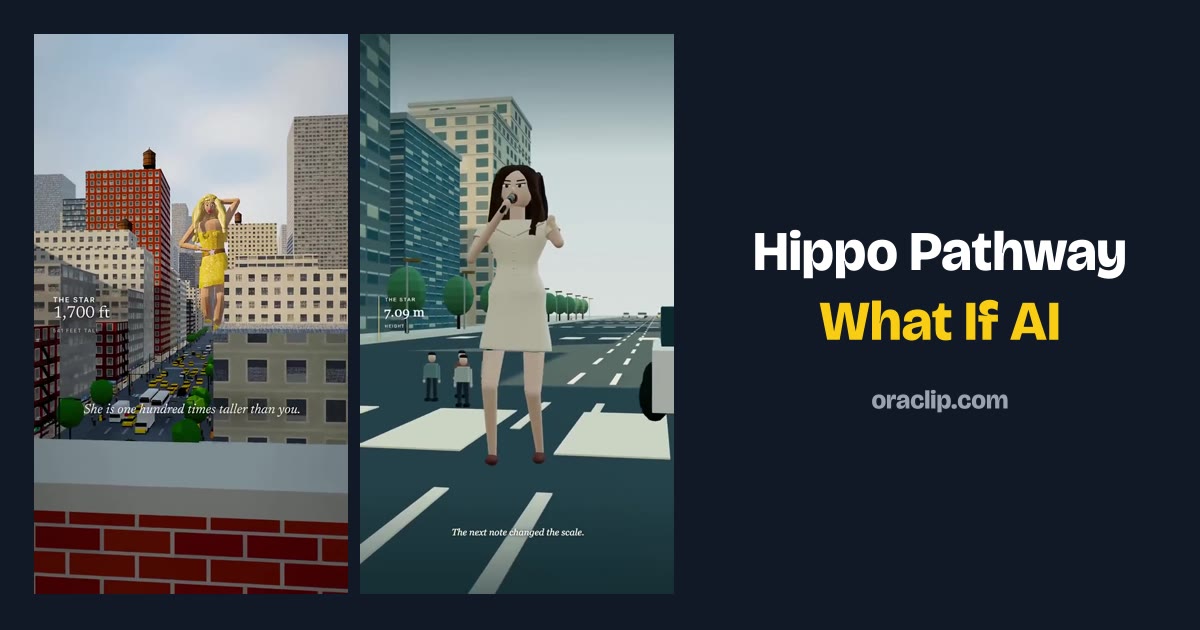
The Hippo Pathway What If trend is the 3D “what if” clip in which a pop star is 100 times taller and dances down a city avenue, taxis between their feet and office workers staring as a waist slides past the 23rd floor. This guide explains where the Hippo Pathway What If idea came from, how the 10-second scene is built, and how to make your own version from one photo — or two, if you want the giant on your street — on Oraclip's Hippo Pathway What If AI page, including the pet and street versions, what it costs and how to post it.
Skip to the generator: Hippo Pathway What If AI →
Clip: @man_ia_c on TikTok, posted 7 October 2026, shown muted with credit. Open the original for its sound.
Oraclip's page is its own AI take on the trend, made from your photos. It is not the CapCut template, and Oraclip is not affiliated with CapCut, TikTok, @man_ia_c or the other creators whose clips appear here. The trend's song is not used.
What is the Hippo Pathway What If trend?
Hippo Pathway What If is a 3D “what if” format. On 7 October 2026 TikTok creator @man_ia_c posted “What if a pop star was 100 times taller?”: the Hippo pathway, a real set of cell signals that tells organs when to stop growing, is imagined switched off, and a singer reaches 541 ft and dances down a city avenue in a sparkly yellow stage outfit.
The original clip had about 7.1 million views when we read the public figure on 13 November 2026. A sequel from the same creator had about 2.7 million. Viewers named the creator's wordless “oh-eh-oh” track after the line on screen, Hippo Pathway. Other accounts made concert, rose-rain and storm versions, and around 7 November 2026 the hashtag #hippopathwaywhatiftrend and a CapCut “What if” template followed.
People search “hippo pathway”, “hippo pathway what if” and “hippo pathway song” for the same idea. Sites also call it the giant pop star or 100-times-taller trend. If you want the audio explained in more detail — including why Oraclip does not ship the creator's track — read Hippo Pathway song: the What If trend audio explained.
The joke is simple and needs no language: you, at skyscraper size, with the city at your feet. That is why a single still photo is enough to remake it.
The clips below, and the ones on the Hippo Pathway What If AI page, are the creators' own viral videos, re-hosted without sound, with credit and a link. They show how the format looks in the wild. They are not clips Oraclip generated.
How the 10-second scene is built
The versions that spread all keep the same three beats. Oraclip's generator is designed around that structure, so it helps to know what each stretch is doing:
- 0–3 seconds, from a rooftop. The giant walks down the avenue. Cars pass between their feet, and the scale is obvious in one wide shot.
- 3–6 seconds, from an office. On about the 23rd floor, the giant's waist glides past the window. This is the “that cannot be a person” beat.
- 6–10 seconds, from the street. The giant mimes singing into a microphone, dances and waves. The face from your photo is meant to be readable here.
Ten seconds is enough for that arc. The page does not ask you to storyboard it; the city, the scale and the moves are already set.
Clip: @weltghost on TikTok, posted 6 November 2026, about 2.6 million views as read on 13 November 2026, shown muted with credit.
How to make the Hippo Pathway What If AI video
You do not need a city, a stage outfit or the CapCut template. You need one clear photo, about a minute, and credits for one render. Open Hippo Pathway What If AI and work through the generator under the heading.
Step 1: upload the giant's photo
Photo 1 is always the giant: you, a friend who agreed, or your pet. The model has to read a whole body over the rooftops and a clear face in the last seconds, so:
- one adult or one pet per photo, full body or at least waist up;
- face clearly visible, looking toward the camera;
- daylight or a bright room, no heavy filter;
- the outfit you want on the giant, if you care about it.
Skip group photos, two pets in one frame, blurry or head-only close-ups, sunglasses that hide the face, and anyone under 18. Only upload photos of yourself, your own pet, or adults who agreed to be in the clip. No celebrities, singers, public figures or look-alikes.
Step 2: decide whether the giant walks down your street
Photo 2 is optional. With one photo, the giant walks down a big city avenue. Add a picture of your street, or the view from your window, and the giant is designed to rise behind the roofs and stop outside it. Keep people away from the camera in that second photo; a wide street view works best.
Step 3: choose a version
Pick one of three versions. The scale is the same in all of them: one hundred times taller.
- You as the giant (1 photo). A sparkly yellow stage outfit, a microphone and a whole avenue to dance down. The classic version.
- Your pet as the giant (1 photo). Your dog or cat pads down the avenue with a little yellow bow, peeks into an office window and sits down between the towers. Any breed works if the whole body is in view.
- Giant on your street (1–2 photos). Add photo 2 and the giant turns up on your block. With one photo you still get an ordinary street at dusk.
There is one short optional field for a detail, such as “a silver jacket” or “rain at night”. One phrase is enough; a paragraph is more likely to fight the fixed scene than improve it. You do not write a prompt for the whole clip.
Step 4: pick a quality and generate
A 10-second clip costs 480 credits at 480p (the default) or 1,010 credits at 720p with Seedance 2.0 Mini, and the price is the same with one photo or two. The photos are free inputs. 480p is fine for most phone feeds; 720p is sharper if you want the face crisp against the towers.
There is no free preview: every render uses credits, and failed renders are refunded automatically. The exact cost is always shown before you generate. Plans and credit packs are on the pricing page.
Step 5: check the clip, then post it
You get a vertical 9:16 MP4. The page is designed to generate city sound effects with the clip: footsteps, horns and a cheering crowd. The creator's Hippo Pathway track is not used, and prompts on the page forbid music and singing so the model does not try to perform that song. If a render comes back silent, a licensed library track is used only to fill the silence; it is not the trend's song and is not mixed over a clip that already has sound.
Watch the file once before you share it. Check that the face still looks like the photo, that the scale reads in the rooftop shot, and that the last seconds are sharp enough to recognise you (or your pet). If a face softens, try a sharper, more frontal, full-body photo rather than a longer detail.
If you want the trending sound on the post, add it in the app when you upload, and credit the creator. Say the clip was made with AI in your caption.
Clip: @weltghost on TikTok, posted 1 November 2026, about 1.0 million views as read on 13 November 2026, shown muted with credit. This is a creator remix, not an Oraclip render.
Photos and ideas that work well
- A full-body photo in daylight. Head-only selfies struggle when the giant is seen from a rooftop.
- Let the pet be the star. A dog or cat at skyscraper size is already the joke, even with the sound off.
- Use your own street for the “who is that outside?” version. A window view or a familiar corner makes the scale personal.
- Keep the caption short. “What if I was 100 times taller?” is enough; the clip does the rest.
- Do not try to look like a famous singer. The page is built to keep the face from your photo, never a celebrity look-alike.
Clip: @whatifimpact on TikTok, posted 8 November 2026, about 803.9 thousand views as read on 13 November 2026, shown muted with credit.
FAQ
What is the Hippo Pathway What If trend?
A 3D “what if” trend from @man_ia_c's video “What if a pop star was 100 times taller?”, posted on 7 October 2026: a 541 ft singer dances down a city avenue. Viewers named its wordless song Hippo Pathway, and in November 2026 sequels, covers and a CapCut template made it a trend.
How do I make a Hippo Pathway What If video of myself?
Open Hippo Pathway What If AI, upload one photo of yourself, pick You as the giant and press generate. The page is designed to return a 10-second vertical MP4: you, 100 times taller, dancing down a city avenue. You do not write a prompt.
Can I make my pet the giant, or put the giant on my street?
Yes. Pick Your pet as the giant and upload one photo of your dog or cat. Or pick Giant on your street and add a photo of your street as photo 2. With one photo and that version you still get an ordinary street at dusk.
How many credits does it cost?
A 10-second clip costs 480 credits at 480p or 1,010 credits at 720p with Seedance 2.0 Mini. The price is the same with one photo or two, the photos are free inputs, and failed renders are refunded automatically. There is no free preview.
Which AI model makes the video?
Seedance 2.0 Mini, generating a 10-second 9:16 clip. The page keeps the city, the scale and the moves fixed so you only choose photos, a version and a quality.
Does it use the Hippo Pathway song?
No. The song is the creator's own track, so the clip is designed to come with generated city sound effects instead: footsteps, horns and a cheering crowd. A licensed library track only fills in when a render is silent. You can add the trending sound in the app when you post, and credit the creator.
Is this the CapCut template or the original video?
No. The CapCut template drops a ready-made giant into a photo. This page generates a new video of the same idea from your photos. Oraclip is not affiliated with CapCut, TikTok, @man_ia_c or the creators shown here.
Can I use a photo of a celebrity or a child?
No. Only photos of yourself, your own pet, or adults who agreed to be in the clip. No children, celebrities, public figures or look-alikes.
More dance and pet trends
- Hippo Pathway song: the What If trend audio explained: what the track is, and why the page does not include it.
- Ding Ding Ding AI: merge copies of your pet into their chubbiest version.
- Parking Lot Dance AI and Neon Dance AI: short dance clips from a photo.
- Make a photo sing AI: a different singing-photo format, with its own rules.
- All trends and pricing.
Photo ready? Make your Hippo Pathway What If video.