
Drone Shot Prompts for AI Video: 4 FPV and Aerial Clips from X to Copy
Four drone shot prompts from X with finished clips: an FPV mansion fly-through, a Kling 4.0 one-take aerial motorcycle chase, a cheetah tracking shot and an FPV move through a burning windmill.
 Oraclip Team
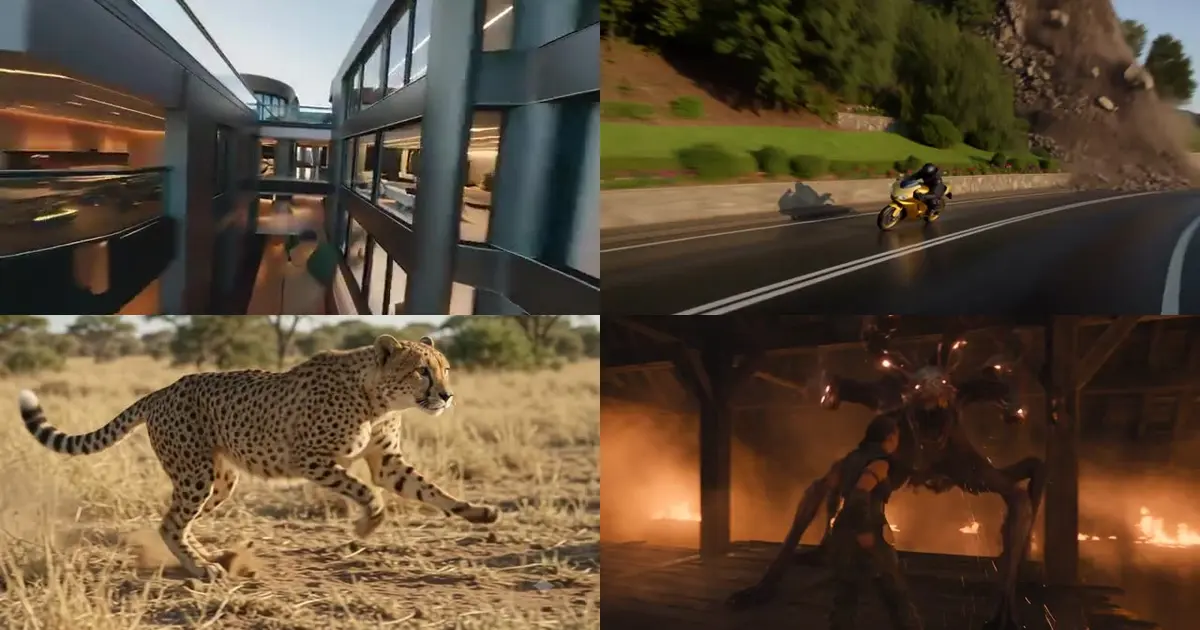
Search "drone shot prompt" and you mostly get template lists: one camera move, one altitude, one made-up location, and no finished clip. These four prompts were posted on X on November 9–10, 2026, each with the video it produced, and each is already in the Oraclip library: an FPV fly-through of a luxury mansion, a Kling 4.0 one-take aerial chase of a motorcycle outrunning a landslide, a Gemini Omni wildlife tracking shot of a cheetah, and a short FPV-style move through a burning windmill. For each one you get the creator, the original post, a short excerpt, what it does, and a deep link to run it.
Do it now: open the Seedance 2.5 generator →, or pick a prompt below and hit Try in Oraclip. For more camera language, see cinematic AI video prompts and the cinematic shot director skill.

What a drone shot prompt needs
Template guides say "one move per clip", and for a 5-second shot that is good advice. The four creators below go further: they describe a whole flight path and still get a clean result, because they spell out the parts the model would otherwise guess.
| Part | What it does | Example below |
|---|---|---|
| Shot type up front | "FPV drone-style", "one uninterrupted aerial shot", "camera tracks" tells the model the camera is flying | all four |
| A route, not a vibe | Where the camera starts, what it passes through, where it ends | pool → terrace → glass doors → living room |
| Height and distance | Metres above the ground or how close the camera stays | "20–85 meters above the road" |
| What stays readable | The subject that must stay identifiable while the camera moves | "keeping the racing motorcycle identifiable" |
| Light and time of day | Golden hour or fire light does more than "cinematic" | golden-hour mansion, burning windmill |
| No cuts | Say "one continuous take" or "no cuts" so the model doesn't edit | motorcycle, mansion |
1. FPV drone luxury mansion walkthrough, by @xnouraya
"Create a hyper-realistic cinematic architectural walkthrough of an ultra-luxurious contemporary mansion during golden hour… Camera Movement: Use a smooth, continuous FPV drone-style cinematic movement. Fly around the exterior terrace, glide between the architectural structures, and smoothly enter the house through the glass openings…" — @xnouraya on X
What it does: a 10-second Seedance 2.5 real-estate fly-through. The prompt is split into labelled blocks (opening scene, exterior, camera movement, interior tour, final scene, visual style), so the route reads like a shot list: rooftop infinity pool, terrace, through the glass, marble living room, double-height hallway.
Run it on Oraclip: open the prompt page → Try in Oraclip. Swap the house description for your own property or a product showroom, and keep the Camera Movement block as it is.
2. Motorcycle one-take aerial chase, by @umesh_ai

"ULTRA-PHOTOREALISTIC, 15 seconds, one uninterrupted aerial shot. A gold racing motorcycle accelerates along a broad hillside road… Follow ten connected aerial positions along one curve: rear-left, directly behind, rear-right, far right… Remain 20–85 meters above the road in open valley air." — @umesh_ai on X
What it does: a 15-second Kling 4.0 chase filmed as a single drone orbit. Instead of "dynamic camera", it lists ten camera positions in order and gives a height range, so the drone circles the rider while a landslide grows behind him. It also says how the clip ends ("before the rider reaches that shrinking opening"), which keeps the last seconds from drifting.
Run it on Oraclip: open the prompt page → Try in Oraclip with Kling 4.0. Keep the ten-position list and change the subject (a car, a horse, a mountain biker).
3. Cheetah savannah sprint tracking shot, by @MrDasCreates

"A powerful cheetah suddenly bursts into a full-speed sprint across the African savannah, chasing its prey through golden grass. Dust explodes beneath its paws as the camera tracks its incredible speed in dramatic slow motion…" — @MrDasCreates on X
What it does: the shortest prompt here, made with Gemini Omni 1.2 Flash. It is a wildlife-documentary tracking shot: one subject, one direction, "the camera tracks" and the light ("golden sunlight"). It shows that a follow shot doesn't need a long brief when there is only one thing to follow.
Run it on Oraclip: open the prompt page → Try in Oraclip with Gemini Omni 1.2 Flash. For a real drone feel, add a height ("low, two meters above the grass") and "camera follows from the side".
Copy the @MrDasCreates prompt →
4. Burning windmill monster fight, by @Alin_Reaper05

"A monster hunter fights a grotesque creature inside a burning windmill, wooden beams collapsing around them. The camera moves continuously through the structure while sparks, smoke and debris create chaotic cinematic motion." — @Alin_Reaper05 on X
What it does: a two-sentence Seedance 2.5 prompt that turns an interior into an FPV route: "the camera moves continuously through the structure". The beams, sparks and smoke give the camera things to fly past, which is what sells the speed.
Run it on Oraclip: open the prompt page → Try in Oraclip. Try the same sentence with a different structure (a lighthouse, a cathedral, a warehouse).
Copy the @Alin_Reaper05 prompt →
How to write your own drone shot prompt
- Name the shot first: "FPV drone fly-through", "one uninterrupted aerial shot" or "tracking shot".
- Write the route: start point, what the camera passes, end point.
- Give a height or distance: "20 meters above the road", "two meters above the grass".
- Say what must stay readable: the subject, the building, the road.
- Pick the light: golden hour, blue hour, fire light.
- Add "no cuts" and how the clip should end.
- Generate on Oraclip. You see the credit cost before you run. Start with Seedance 2.5 or Kling 4.0.
FAQ
What is a good drone shot prompt for AI video? Start with the shot type, then describe the camera route, a height, the subject and the light, and end with "no cuts". The mansion and motorcycle prompts above are full examples you can copy.
Can I use a drone shot prompt with my own photo? Yes. Upload the photo as the first frame and keep the camera sentences; the model moves the camera through your scene. Wide photos work better than close-ups, because the camera needs room to travel.
Which model is best for drone and FPV shots? These four used Seedance 2.5, Kling 4.0 and Gemini Omni 1.2 Flash. Long, multi-position flights (like the motorcycle chase) suit Kling 4.0 and Seedance 2.5; a short follow shot works on all three. Compare them in Kling 4.0 vs Seedance 2.5.
Is it free? Oraclip shows the credit cost before you generate, so you always know the price first. Pricing is on each model page.
Where are more camera prompts? Browse camera-move prompts in the library, or read cinematic AI video prompts and Seedance 2.5 prompts.