
You Never Let Her Pay Trend: How to Make the AI Video
How to make the You Never Let Her Pay trend video (Dinner's On Me) from one or two photos: the sponge wallet skit, couple and pet versions, credits.
 Oraclip Team
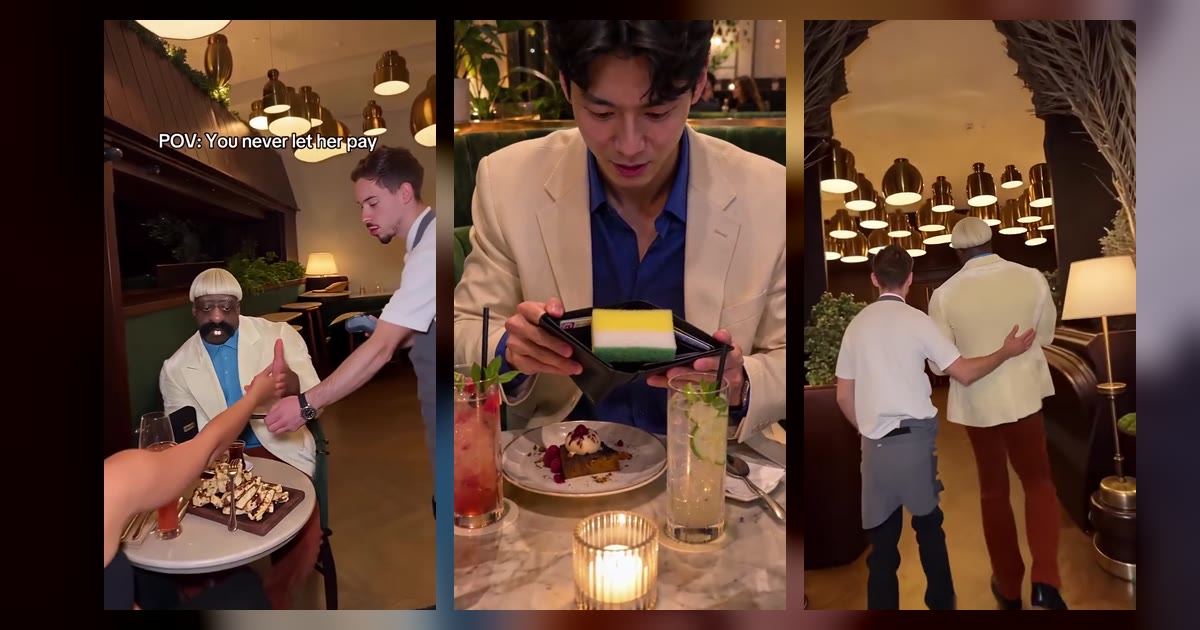
The You Never Let Her Pay trend is the dinner-date skit where the man waves away his date's card, opens his wallet with total confidence and finds nothing inside but a yellow dish sponge, then gets walked to the kitchen sink by the waiter. This guide explains where the You Never Let Her Pay trend came from, how the 10-second skit is built, and how to make your own version from one or two photos on Oraclip's You Never Let Her Pay AI page, including the couple and pet versions, what it costs and how to post it.
Skip to the generator: You Never Let Her Pay AI →
Clip: @boby.biggsjohnson on TikTok, posted 10 November 2026, shown muted with credit. Open the original for its sound.
Oraclip's page is its own AI take on the trend, made from your photos. It is not the CapCut template, and Oraclip is not affiliated with CapCut, TikTok, @boby.biggsjohnson or the other sites whose clips appear here.
What is the You Never Let Her Pay trend?
You Never Let Her Pay is an AI comedy skit that TikTok creator @boby.biggsjohnson posted on 10 November 2026 with the caption “POV: You never let her pay”. The setup takes a few seconds to read: a candle-lit restaurant, a couple at a small table, the bill on its way. His date reaches for her card. He stops her hand, smiles, and pulls out his wallet as if he does this every night. The wallet opens to the camera and holds one thing: a kitchen sponge. A beat later the waiter puts a hand on his shoulder and leads him through the kitchen door to a stack of dirty plates.
The original clip had about 8.3 million views when we checked it on 12 November 2026, two days after it went up. From 11 November, CapCut templates and tutorials in English, French and Malay had people putting their own faces in the suit, and about 50 creators posted their own version in the first week. Some template sites sell the same skit under the name Dinner's On Me; it is the same joke. If you want the meaning of the joke and the naming in more detail, read Dinner's On Me meme: the sponge wallet joke explained.
The reason it travels so well is that it needs no language. The confidence, the reveal and the guilty grin are all visual, so the clip works in any feed, and it works with any face.
How the 10-second skit is built
Every version you will see follows the same four beats. Oraclip's generator uses the same structure, so it helps to know what each second is doing:
- 0–2 seconds, the hand wave. The date reaches for the card machine; the one who pays pushes her hand back with a smile.
- 2–4 seconds, the reveal. The wallet flips open toward the camera: one yellow sponge, no cash, no card.
- 4–6 seconds, the freeze. A pause, then a slow, guilty grin straight into the lens. This is the beat people screenshot.
- 6–10 seconds, the sink. The waiter walks him through the kitchen door to a pile of plates and a running tap.
Ten seconds is just enough for that arc. Shorter clips lose the freeze; longer ones drag after the punchline.
Clip: remakethetrend.com, a public AI demo of the trend (11 November 2026), shown muted with credit.
How to make the You Never Let Her Pay AI video
You do not need a restaurant, a waiter, a sponge or a CapCut template. You need one clear photo, about a minute, and credits for one render.
Step 1: pick the photo of whoever pays
Photo 1 is always the one who insists on paying. That can be you, a friend who agreed, or your dog or cat. The punchline is the face when the sponge appears, so the face has to be easy for the model to read:
- one adult (or one pet) per photo, from the waist up;
- face clearly visible, looking toward the camera;
- daylight or a bright room, no heavy beauty filter;
- the outfit you want on the date, if you care about it.
Skip sunglasses, a hand over the face, group photos of three or more, and anyone under 18. Only upload photos of yourself, your own pet, or adults who agreed to be in the clip. No celebrities or strangers.
Step 2: decide whether your date is in it
Photo 2 is optional. Without it, a new AI character sits across the table and never gets anyone's real face. With it, photo 2 becomes the date who watches the whole thing go wrong. One photo of the two of you side by side also works; the person on the left pays.
Step 3: choose a version
Open You Never Let Her Pay AI and pick one of three versions. The restaurant, the sponge and the sink are the same in all of them:
- Just you (1 photo). You are the smooth one who insists on paying.
- You + your date (2 photos). Photo 1 pays, or tries to; photo 2 laughs in disbelief across the table.
- Your pet pays. Your dog or cat sits up in a tiny bow tie, pushes the card back with a paw and opens a wallet full of sponge. Add photo 2 if you want to be the date.
There is one short optional field for a detail, such as “a white tuxedo” or “a rooftop restaurant”. One phrase is enough; a paragraph is more likely to fight the fixed scene than improve it.
Step 4: pick a quality and generate
A 10-second clip costs 480 credits at 480p (the default) or 1,010 credits at 720p with Seedance 2.0 Mini, and the price is the same with one photo or two. The photos are free inputs. 480p is fine for most phone feeds; 720p is sharper if you want both faces crisp at the table.
There is no free preview: the credits are used when you press generate, and failed renders are refunded automatically. The exact cost is always shown before you generate. Plans and credit packs are on the pricing page.
Step 5: check the clip, then post it
You get a vertical 9:16 MP4 with generated sound effects: restaurant chatter, a wallet zip, a comic sting and the clatter of dishes. Watch it once before you share it. Check that the face still looks like the photo, that the sponge reveal is readable, and, in the couple version, that the two of you never merge into one person. If a face softens, try a sharper, more frontal photo rather than a longer detail.
The original creator's sound is not used. If you want the trending sound, add it in the app when you post. Say the clip was made with AI in your caption.
Ideas that work well
- Tag the friend who always grabs the bill. The joke lands hardest on the person who really does insist on paying.
- Flip the roles. Photo 1 does not have to be a man. Whoever pays is the one with the sponge.
- Let the dog pay. The pet version reads well even with the sound off, because a dog in a bow tie with a wallet is already the joke.
- Keep the caption short. “POV: you never let her pay” or “dinner's on me” is enough; the clip does the rest.
- Make a pair. Post the couple version, then the pet version with the same date photo, as a two-part joke.
Clip: talkpix.ai, a public AI demo sold as “Dinner's On Me” (10 November 2026), shown muted with credit.
Common mistakes
- Uploading a group shot. The page is built for one payer and, optionally, one date.
- Hiding the face. Sunglasses, hats pulled low or a hand over the face blur the punchline.
- Writing a whole script in the detail field. The scene is fixed; one short detail is plenty.
- Expecting real money in the wallet. It is always the sponge. That is the joke.
- Using someone's photo without asking. Only adults who agreed, and never children.
- Skipping the playback check. Every render is new; watch it before you post.
FAQ
What is the You Never Let Her Pay trend?
An AI comedy skit posted on TikTok by @boby.biggsjohnson on 10 November 2026, captioned “POV: You never let her pay”. On a dinner date a man stops his date's card, opens his wallet to a kitchen sponge, and the waiter walks him to the sink to wash dishes. Some sites call it Dinner's On Me.
How do I make the You Never Let Her Pay video with AI?
Open You Never Let Her Pay AI, upload one photo of whoever pays (or two, for you and your date, or a photo of your pet), pick a version and press generate. You get a 10-second vertical MP4 of the whole skit. You do not write a prompt.
How many credits does it cost?
A 10-second clip costs 480 credits at 480p or 1,010 credits at 720p with Seedance 2.0 Mini. The price is the same with one photo or two, and failed renders are refunded automatically.
Which AI model makes the video?
Seedance 2.0 Mini, generating a 10-second 9:16 clip with sound effects. The page keeps the restaurant, the sponge and the sink fixed so you only choose photos, a version and a quality.
Is two photos more expensive than one?
No. One photo or two costs the same: 480 credits at 480p or 1,010 at 720p.
Can my dog or cat be the one who pays?
Yes. Pick Your pet pays and upload a photo of your dog or cat. Add photo 2 if you want to be the date across the table.
Does it use the original sound or the CapCut template?
No. The clip comes with its own generated sound effects, and it is a new AI video made from your photos, not the CapCut template. The creator's sound and clip stay theirs.
Can I use photos of other people?
Only photos of yourself, your own pet, or adults who agreed to be in the clip. No children, celebrities or strangers. The dinner-date version is for adults only.
More couple and comedy trends
- Dinner's On Me meme: the sponge wallet joke explained: the meaning, the names and the variations.
- Fancy cafe AI: “your first time in a fancy cafe”, from one or two photos.
- Closing door prank AI: another short comedy prank from one photo.
- Hotel lobby AI: two of you perform at the hanging mic on an orange stage.
- Groomer vs Dog AI: your dog fights back at grooming time.
- All trends and pricing.
Photo ready? Make your You Never Let Her Pay video.