
Gemini Omni 1.2 Flash: What's New, Limits and Credit Cost
Gemini Omni 1.2 Flash explained: Google's fast video model with 15 s clips, reference images, first/last frame and video editing, plus its cost in Oraclip.
 Oraclip Team

Gemini Omni 1.2 Flash is Google DeepMind's new fast video model, released on November 5, 2026. It makes clips of 3 to 15 seconds with sound, follows reference images more closely than Gemini Omni 1.1, and can edit an existing clip from a plain instruction. This guide explains what Gemini Omni 1.2 Flash does, what changed from 1.1, where it falls short and what it costs in Oraclip. Facts were checked on November 9, 2026.
What is Gemini Omni 1.2 Flash?
Gemini Omni 1.2 Flash is the second version of Google's Gemini Omni video model and the "Flash" tier: built for speed and cost rather than maximum quality. Google made it generally available on the Gemini API and Google Cloud on November 5, 2026, and is rolling it out in Google Vids, Flow, Google Ads and the Gemini app, where 15-second clips go to Google AI Ultra subscribers first.
One model handles several jobs that usually need separate tools:
- Text to video: describe the scene, action, camera and sound.
- Reference images: give it a character, product or style and keep it consistent.
- First and last frame: start on one image and end on another in one camera move.
- Video editing: swap a background, replace an object or change the lighting in a clip you already have.
Every output carries Google's invisible SynthID watermark.
What changed in Gemini Omni 1.2 Flash vs 1.1
Google lists five improvements over Gemini Omni 1.1 Flash:
| Gemini Omni 1.1 Flash | Gemini Omni 1.2 Flash | |
|---|---|---|
| Longest clip | 10 s | 15 s, set in 1-second steps from 3 s |
| Google API price at 720p | 30% more than 1.2 | $0.07 per second |
| Reference adherence | Faces and products could drift | Faces, garments, packaging text and brand colors hold across angles |
| Editing | Shorter clips | Multi-turn edits across a full 15 s clip |
| Camera and audio | More unwanted jump cuts | FPV flythroughs and orbits with fewer jump cuts, clearer lip-sync, multi-speaker dialogue |
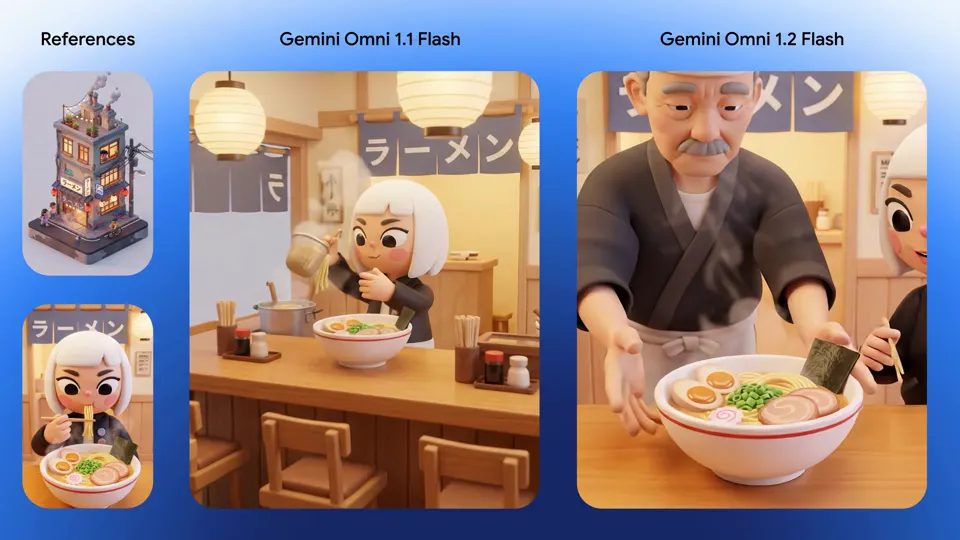
What Gemini Omni 1.2 Flash is good at
Keeping a subject consistent. In Google's virtual try-on demo, one model photo and front-and-back shots of three outfits become a 15-second sequence with turns and match cuts, without the face or garment details changing. The same applies to products: packaging text and brand colors are where earlier video models usually slip.
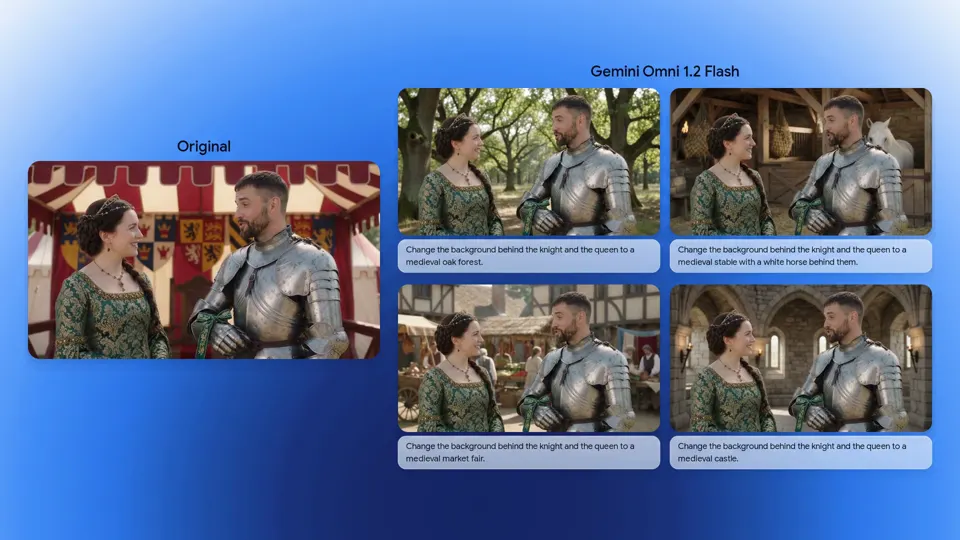
Editing a clip instead of starting over. The background demo keeps a knight and a queen's performance intact while the scene behind them changes from a pavilion tent to an oak forest, a stable, a market fair and a castle, one instruction at a time.
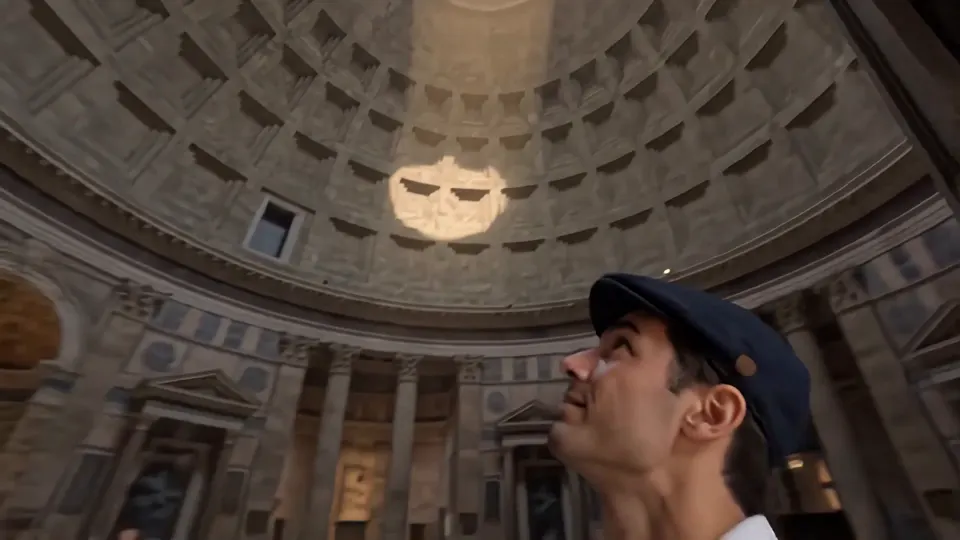
Long camera moves without cuts. The Pantheon demo uses two architecture photos as the start and end of one continuous drone flight across the square, through the doors and up to the oculus. The castaway demo above pulls from a close-up to an aerial island view in a single shot.
Dialogue. Lip-sync is clearer than in 1.1, and when several characters speak, their voices stay with the right faces.
Where Gemini Omni 1.2 Flash falls short
- Fast, complex motion. Google itself says it is still working on fast sports action, rapid scene changes and complex physics.
- 15 seconds is the ceiling. For longer single takes, Kling 4.0 (up to 30 s) and Wan 3.0 (up to 30 s) go further.
- First + last frame clips stop at 10 seconds. Only a single first frame allows the full 15 s.
- Edits keep the source length. You cannot ask an edit to make a clip longer or shorter.
- Untested on Oraclip. We have not published our own render of this model yet; the examples here are Google's launch demos.
What Gemini Omni 1.2 Flash costs in Oraclip
Oraclip runs Gemini Omni 1.2 Flash through KIE and charges per second of output:
| Length | 720p | 1080p | 4K |
|---|---|---|---|
| 3 s | 140 credits | 160 credits | 340 credits |
| 5 s | 230 credits | 260 credits | 560 credits |
| 8 s | 370 credits | 410 credits | 890 credits |
| 10 s | 460 credits | 520 credits | 1,120 credits |
| 15 s | 690 credits | 770 credits | 1,670 credits |
Video editing is billed on the length of the clip you upload, at the same per-second rate: editing an 8-second clip at 720p is 370 credits. Reference images and frames add nothing. The exact cost shows before you generate, and a failed render is refunded. Plans are on the pricing page.
For comparison, 10 seconds at 720p costs 760 credits on Wan 3.0 and 1,440 on Kling 4.0, so Gemini Omni 1.2 Flash is one of the cheaper ways to get a 10-second clip with sound, and the only video model in Oraclip that renders 4K.
How to use Gemini Omni 1.2 Flash in Oraclip
- Open the Gemini Omni 1.2 Flash video generator, or pick it in the video model menu of the creator.
- Choose what to start from: a prompt, up to 6 reference images, a first frame (optionally a last frame), or one clip of up to 15 seconds to edit.
- Set the length (3–15 s), resolution (720p, 1080p or 4K) and aspect ratio (auto, 16:9 or 9:16).
- Generate, check the result, then download it from your library.
How to prompt Gemini Omni 1.2 Flash
- Name the camera move. "One continuous FPV shot", "slow orbit", "crash zoom out, no cuts" all map to things the model was tuned for.
- Say what each reference is for. "Image 1 is the character, image 2 is the jacket, keep the logo text exactly as shown."
- Edit one thing per turn. "Change the background behind the knight and the queen to a medieval oak forest" works better than a list of five changes.
- Write the sound. Dialogue in quotes, plus ambience and music, since the model generates audio with the picture.
- Draft at 720p. A 5-second test is 230 credits; render the keeper at 1080p or 4K.
Our AI video prompt guide covers a fuller prompt structure.
Gemini Omni 1.2 Flash FAQ
Is Gemini Omni 1.2 Flash free?
Google Vids includes 15-second clips with a Google account, and the Gemini app is rolling them out to Ultra subscribers. Through an API it is paid per second. In Oraclip it costs credits, from 140 credits for 3 seconds at 720p; signing up is free.
How long can Gemini Omni 1.2 Flash videos be?
3 to 15 seconds, up from 10 seconds in Gemini Omni 1.1 Flash. With both a first and a last frame the limit is 10 seconds.
Does Gemini Omni 1.2 Flash generate sound?
Yes. It generates speech, ambience and music with the video, and Google says lip-sync and multi-speaker dialogue are clearer than in 1.1.
Can Gemini Omni 1.2 Flash edit an existing video?
Yes. Upload a clip of up to 15 seconds and describe the change: a new background, a swapped object, different weather or lighting. The output keeps the source length.
Try the Gemini Omni 1.2 Flash video generator
Use it when a character or product has to stay the same across shots, when you want to fix a clip instead of re-rendering it, or when you need a 4K export. Start on the Gemini Omni 1.2 Flash model page and compare it with Kling 4.0 for longer takes.
Sources (checked November 9, 2026): Google: Gemini Omni 1.2 Flash announcement · Google Cloud: Gemini Omni 1.2 Flash generally available · Google DeepMind: Gemini Omni · KIE: Gemini Omni Flash 1.2 API