
来自 X · Motion Transfer
动作迁移提示词
从 X 公开帖子精选的 Motion Control / Motion Transfer 视频提示词,可在 Oraclip 试用,并保留作者署名与原帖链接。

The weirdest way to make AI copy a dance better? Take the dancer out of
The weirdest way to make AI copy a dance better? Take the dancer out of the video. Sounds backwards. But this simple trick can dramatically change how motion transfer works in Seedance 2.0. When you give a video of someone dancing directly to a video model, you’re not giving it “motion.” You’re giving it everything: The person. Their face. Their clothes. The room. The lighting. The camera. The background. And somewhere inside all that noise — the choreography. Now ask the model to put that movement onto a completely different character. You’re essentially asking it to solve ten problems at once. And then we wonder why the choreography drifts. The trick is to separate two things that shouldn’t be mixed: WHO is moving and HOW they are moving. Here’s the workflow: 1. Lock the character first. Create the character reference in GPT Image 2 — face, body, clothing, overall identity. The goal is simple: the character’s identity should exist independently from the movement. 2. Strip the dancer out of the source video. Convert the dance footage into a depth map. Instead of giving the model the original performer, you give it spatial information — essentially a representation of where the body is in 3D space. No face. No clothes. No background. No visual identity. Just movement. 3. Give the model two separate references. Character sheet = identity Depth map = motion Now each input has one job. And that’s the important part. 4. Don’t let the references compete. The depth map shouldn’t tell the model who is dancing. The character reference shouldn’t tell it how to dance. You’re removing the ambiguity instead of asking the model to resolve it. That’s why this works. Raw footage contains an enormous amount of information, and the model has to decide what matters. A depth map dramatically narrows the problem. Instead of: “What am I supposed to copy from this video?” the model gets something closer to: “Here is the movement. Put this character inside it.” And that distinction matters. Because better AI video isn’t always about giving the model more information. Sometimes it’s about giving it less — but making every piece of information intentional. This opens up some interesting workflows: → Transfer choreography onto completely original characters → Create motion-capture-style results without a mocap suit → Preserve specific movements more accurately → Build character showcases from existing performance footage → Separate identity, motion and environment instead of letting them bleed into each other The character sheet answers: “Who is dancing?” The depth map answers: “How are they moving?” And keeping those two questions separate may be one of the most useful tricks for getting more reliable motion transfer out of AI video models. The model doesn’t necessarily need to become smarter. Sometimes you just need to stop giving it the wrong problem.

Saw everyone making these 4×4 dance sheets and had to try it myself. Pip
Saw everyone making these 4×4 dance sheets and had to try it myself. Pipeline: GPT Image 2.5 → 16-pose sheet Grok Imagine (image-to-video) → 8s dance clip Prompts in the replies 👇 GPT Image prompt: Create a 4×4 dance pose sheet featuring the similar character in Genshin https://t.co/qwClcGcDfb

Playing with my son’s toy cars and magnetic tiles for some Seedance 2.5
Playing with my son’s toy cars and magnetic tiles for some Seedance 2.5 testing. The idea was simple: use real toy movement as a motion reference, then see how Seedance translates it into a cinematic real-world scene. A traffic jam made from toy cars became a full-scale road scene. A toy excavator clearing the jam became a massive construction vehicle pushing through real cars. A magnetic-tile house became an actual building attempt. What’s interesting is that Seedance doesn’t just copy the action. It picks up on camera angle, object dominance, timing, contact points, weight, direction, and even accidental scale cues. In one clip, the toy excavator looked huge because it was close to the camera and cropped at the edge of frame. Seedance translated that almost literally, making the real excavator tower over the cars. That’s the fascinating bit. The reference video becomes more than choreography. It becomes a kind of physical prompt: perspective, momentum, gravity, friction, hierarchy, and staging all baked into a few seconds of footage. Basically: tabletop previs -> real-world cinematic scene. Still messy. Still unpredictable. But honestly, that’s what makes it fun. Feels less like prompting now, and more like directing motion with whatever is lying around the house. Share this with someone who still thinks AI video is just about writing better prompts.
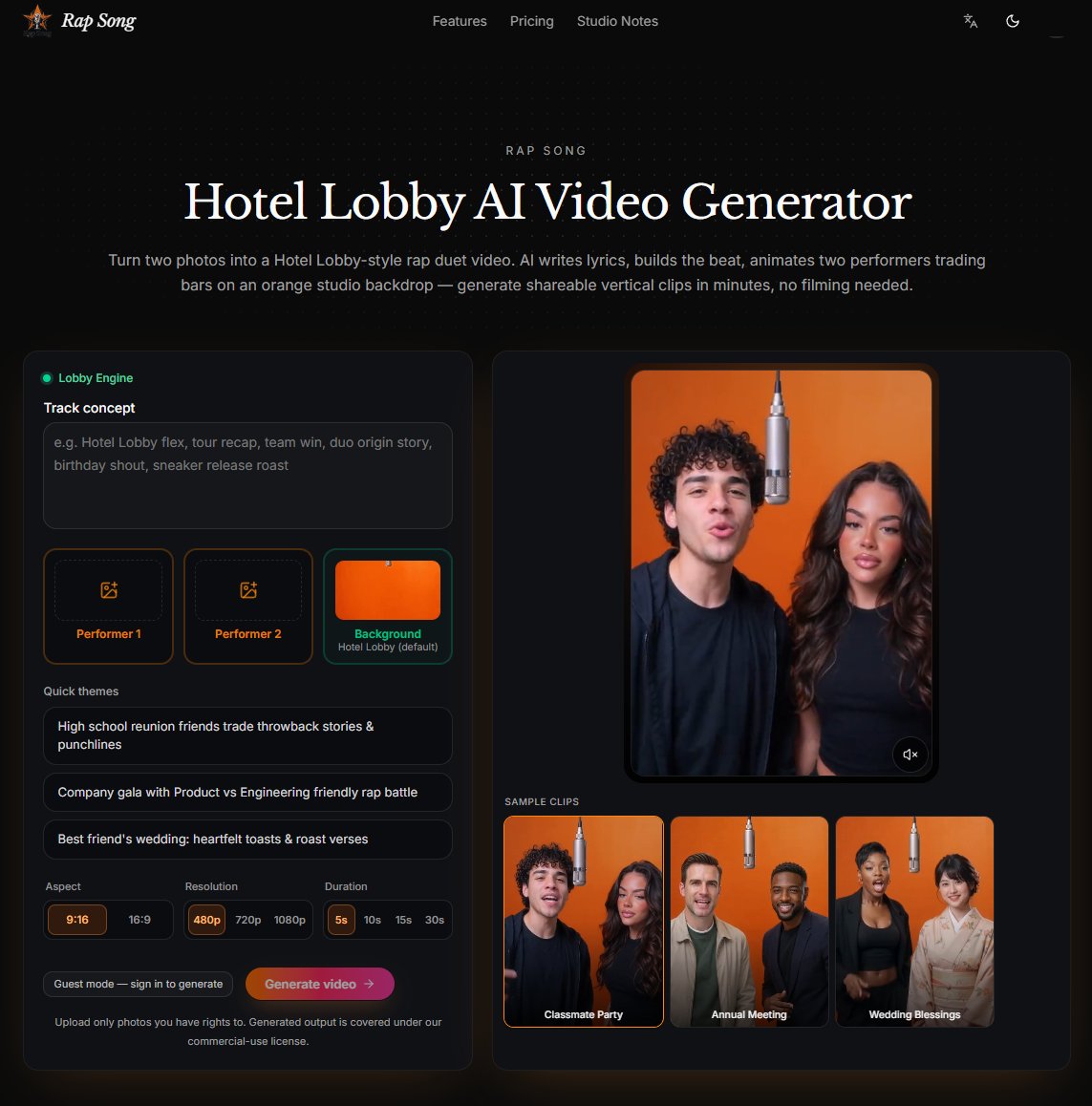
Hotel Lobby AI Video Generator 🎤 Turn Two Photos into an AI Rap Video! ✨
Hotel Lobby AI Video Generator 🎤 Turn Two Photos into an AI Rap Video! ✨ Any occasion, any rap style. Upload two photos, enter a prompt, and AI makes your Hotel Lobby-style rap duet — lyrics, beat, vocals, animation, no filming required! 🔥 https://t.co/VK5mqtiwl2 https://t.co/n9Z3CK8eff

Pilla had to try the Hotel Lobby AI trend. Who would you bring to the mi
Pilla had to try the Hotel Lobby AI trend. Who would you bring to the mic? #AITrend #HotelLobby #PillaInvestments https://t.co/UnmMtkOKu8

A few product photos can become a complete 360° product showcase. No com
A few product photos can become a complete 360° product showcase. No complex setup. No professional studio required. Upload 3–9 multi-angle product photos, and Foraivideo turns them into publish-ready 360° videos, MP4 files, or frame sequences for ecommerce product pages, marketing campaigns, and social media. Let customers see every angle. Give great products the presentation they deserve. Try it now: https://t.co/h413BwWkla #AI #ecommerce #ProductPhotography #360ProductView #Foraivideo

Whistle dance, 100% AI generated 🤯 Clean studio background, perfect for
Whistle dance, 100% AI generated 🤯 Clean studio background, perfect for e-commerce product showcase. One reference image is all you need. Full prompt in bio 👇 🛠️ https://t.co/PMtLq9hxhT #AIGC #AIVideo #Fashion #Ecommerce #WhistleDance #MangoAI https://t.co/BTRL02oT2U

OKAY SO WHILE EVERYONE IS BUILDING CLAUDE + OBSIDIAN SECOND BRAINS — MY
OKAY SO WHILE EVERYONE IS BUILDING CLAUDE + OBSIDIAN SECOND BRAINS — MY AI RE-DRESSING PIPELINE IS QUIETLY PRINTING $16,400 A MONTH Been deep in productivity workflows and local LLM notes lately, but the second machine running in the background is doing all the heavy lifting. Took static photos of real girls, used AI to completely re-dress them, and ran a motion-transfer script to make them dance in 4K sync. Sounds like a gimmick until you check the Stripe dashboard. $500 in GPU compute. $16,400 out. Two months. Subscriptions, clothing brand promos, and custom video requests — all stacking on top of each other while people spend 4 hours tweaking note-taking apps. The wild part? Dancing is just 1% of this. Once you master the photo-to-video re-dressing pipeline, you can put these models in any outfit, any location, doing literally anything. Infinite content leverage off a single PC setup. Curious if you want the step-by-step breakdown of this image-to-video workflow, or should I stick to Obsidian setups? Drop a comment below.

Luxury skincare, entirely imagined with AI. ✨🧴 Built this skincare comme
Luxury skincare, entirely imagined with AI. ✨🧴 Built this skincare commercial with MidJourney, Nano Banana Pro, and Seedance. I used MidJourney and Nano Banana Pro to create a consistent visual identity for every environment, product shot, and beauty scene, then brought https://t.co/lxF2d7fyGd

Introducing Higgsfield Genjutsu Restyle. Choose from 20+ animation style
Introducing Higgsfield Genjutsu Restyle. Choose from 20+ animation styles or upload your own reference. Higgsfield API brings Genjutsu’s motion transfer and video editing to your apps and workflows. Now available on Higgsfield and via MCP. https://t.co/THQxSikrJh

POV: our cats turned human for one night 🐈➡️🕺 Every squint and head tilt
POV: our cats turned human for one night 🐈➡️🕺 Every squint and head tilt kept, made with Higgsfield Genjutsu Motion Transfer. #Higgsfield #Genjutsu #MotionTransfer #AIvideo https://t.co/yza9sWfkjS

𝗚𝗿𝗶𝗺𝗺𝗷𝗼𝘄 𝗝𝗮𝗲𝗴𝗲𝗿𝗷𝗮𝗾𝘂𝗲𝘇 𝗺𝗲𝗲𝘁𝘀 𝗔𝗜 𝗘𝗻𝗴𝗶𝗻𝗲𝗲𝗿𝗶𝗻𝗴. ⚡🤖 I took the iconic 𝘉𝘭𝘦𝘢𝘤𝘩
𝗚𝗿𝗶𝗺𝗺𝗷𝗼𝘄 𝗝𝗮𝗲𝗴𝗲𝗿𝗷𝗮𝗾𝘂𝗲𝘇 𝗺𝗲𝗲𝘁𝘀 𝗔𝗜 𝗘𝗻𝗴𝗶𝗻𝗲𝗲𝗿𝗶𝗻𝗴. ⚡🤖 I took the iconic 𝘉𝘭𝘦𝘢𝘤𝘩 character and applied the viral mecha transformation workflow inspired by @davidsaimastery . Instead of just a 2D animation, I pushed the realism to create a "die-cast" physical transformation. No morphing - just rigid, hard-surface mechanics. 𝗧𝗵𝗲 𝗪𝗼𝗿𝗸𝗳𝗹𝗼𝘄: 1️⃣ 𝗥𝗲𝗳𝗲𝗿𝗲𝗻𝗰𝗲 𝗟𝗼𝗰𝗸: Used 𝗦𝗲𝗲𝗱𝗿𝗲𝗮𝗺 𝟱.𝟬 𝗣𝗿𝗼 𝗘𝗱𝗶𝘁 (𝗜𝟮𝗜) on 𝗔𝘁𝗹𝗮𝘀𝗖𝗹𝗼𝘂𝗱 to generate consistent "Pod" and "Mecha" states of Grimmjow. The prompt focused on "gunmetal joints," "studio lighting," and "rigid hard-surface" to keep the design faithful to the manga but elevated. 2️⃣ 𝗧𝗵𝗲 𝗧𝗿𝗮𝗻𝘀𝗳𝗼𝗿𝗺𝗮𝘁𝗶𝗼𝗻: Used 𝗪𝗮𝗻 𝟯.𝟬 𝗜𝗺𝗮𝗴𝗲-𝘁𝗼-𝗩𝗶𝗱𝗲𝗼 (𝗜𝟮𝗩) to animate the unfolding. Every hinge, piston, and lock clicks into place with physical weight. 3️⃣ 𝗧𝗵𝗲 𝗩𝗶𝗯𝗲: Pure mechanical ASMR. A brutal, impulsive personality translated into heavy, precise engineering. ✅ 𝗧𝗵𝗲 𝗦𝘁𝗮𝗰𝗸: 🔹 𝗔𝘁𝗹𝗮𝘀𝗖𝗹𝗼𝘂𝗱 (Orchestration - @atlas_cloud_ai ) 🔹 𝗦𝗲𝗲𝗱𝗿𝗲𝗮𝗺 𝟱.𝟬 𝗣𝗿𝗼 𝗘𝗱𝗶𝘁 (I2I) 🔹 𝗪𝗮𝗻 𝟯.𝟬 𝗜𝟮𝗩 (Animation) Huge shoutout to @𝗱𝗮𝘃𝗶𝗱𝘀𝗮𝗶𝗺𝗮𝘀𝘁𝗲𝗿𝘆 for the blueprint. This combo of his prompt engineering and these new models is a game-changer for anime-to-mecha transitions. 👇 𝗖𝗵𝗲𝗰𝗸 𝗼𝘂𝘁 𝗚𝗿𝗶𝗺𝗺𝗷𝗼𝘄’𝘀 𝗱𝗲𝗽𝗹𝗼𝘆𝗺𝗲𝗻𝘁 𝗶𝗻 𝘁𝗵𝗲 𝘃𝗶𝗱𝗲𝗼. #Bleach #Grimmjow #AIArt #Mecha #Wan3 #Seedream #AIWorkflow #AtlasCloud #DavidSAIMastery #Anime #CGI

Four grey mannequins holding a choreography. Same timing, same weight, n
Four grey mannequins holding a choreography. Same timing, same weight, now with faces, fabric and a European square around them. Seedance 2.5 on SeaArt, GPT-6 Astra. Motion transfer is the hard part. This holds it. #Ad #SeaArtAstra #gpt6astra @SeaArt_Ai @SeaArtCoLab https://t.co/aLJDIjENcX

Making viral dance videos is ridiculously easy now 🤯 Upload an image + a
Making viral dance videos is ridiculously easy now 🤯 Upload an image + a reference video into Higgsfield's Kling Motion Control and let AI do the rest. 💃🔥 AI WITH HUZAIFA #aiwithhuzaifa #AI #HiggsfieldAI #Kling #AIVideo #Viral https://t.co/liLtjddH6n

Ready to scale your AI content? This creator breaks down how Kling AI 3.
Ready to scale your AI content? This creator breaks down how Kling AI 3.0 uses motion control and team workflows to turn solo projects into viral production systems. Don't miss this! #KlingAI #AIvideo #ContentCreation https://t.co/LY1Fbl67FD

Turn any video into your own AI character scene ✨🎬 Use a reference video
Turn any video into your own AI character scene ✨🎬 Use a reference video for the movement, then replace the person and objects with yourself, your AI character, or your own custom images. 1. Create images of yourself or your AI person 2. Add reference images for any objects you want included 3. Choose a video as your motion reference 4. Open Video Gen on Moescape 5. Upload your images + reference video 6. Add the replacement prompt and generate Full workflow + prompt in the comments 👇 Try it yourself on Moescape 🚀 Link in bio #videotovideo #aivideo #anime #aigeneration #moescapeai #aiart #fyp #foryoupage

#InimbaMzansi I am glad uQhawe, Tsaki noPortia are putting the pieces to
#InimbaMzansi I am glad uQhawe, Tsaki noPortia are putting the pieces together regarding the AI video. Even though it was so obvious after uYanga put uAviwe in his place during the Matric Dance https://t.co/ivXzF9WOlW

Motion transfer is one API call away. Higgsfield Genjutsu lets developer
Motion transfer is one API call away. Higgsfield Genjutsu lets developers add motion transfer to their products through a single endpoint, without building the model in-house. For production teams, that's more ways to bring motion-driven video into their workflows. https://t.co/QVAdVPKEHi

Motion transfer is one API call away. Higgsfield Genjutsu lets developer
Motion transfer is one API call away. Higgsfield Genjutsu lets developers add motion transfer to their products through a single endpoint, without building the model in-house. For production teams, that's more ways to bring motion-driven video into their workflows. https://t.co/dCwM1tyQUi

Roadster vs Sheeps Kling 4, 1080p #Kling4 #KlingAI #KlingECP @Kling_ai #
Roadster vs Sheeps Kling 4, 1080p #Kling4 #KlingAI #KlingECP @Kling_ai #ad #reklam https://t.co/kN6gVKWP8a

From a single prompt to a 360° product turntable in @picsart 🪐✨ Testing
From a single prompt to a 360° product turntable in @picsart 🪐✨ Testing the Image-to-Video workflow in Picsart AI Playground using Flux 2 Max and Kling V3. Input, prompt, and final render shown on screen. Comment EARN for the exact prompt and workflow setup! 👇 #picsartearn #picsartpartner #picsartplayground

From product photos to a smooth 360° jewelry video. No studio turntable.
From product photos to a smooth 360° jewelry video. No studio turntable. No complicated editing. Just a few product views — transformed into a richer way for shoppers to inspect the design, setting, and details from every angle. Static images create interest. 360° product video helps build confidence. Would you use this on a jewelry product page? https://t.co/4GbASTJ8xS

Student AI Watch Product Showcase! Our student Mohamed Thihan M (Graphic
Student AI Watch Product Showcase! Our student Mohamed Thihan M (Graphic & 3D Designer) has created a stunning AI-Based Watch Product Showcase Video, highlighting creative visualization and AI-powered design skills. #AIVideo #WatchProduct #ImageCreativeEducationMadurai https://t.co/h0YgxclADK

3/ Creative Product Videos Pollo AI has amazing template for product sho
3/ Creative Product Videos Pollo AI has amazing template for product showcase. Now you no longer need to be good at AI tools (or) prompt engineering. You just need to upload your product images. https://t.co/4QOniibkSi